
Dokta vs Tailride
Side-by-side comparison to help you choose the right tool.

Dokta automates document management for SMBs and freelancers, simplifying invoicing, cash flow, and payment tracking in one powerful tool.
Last updated: April 4, 2026

Tailride
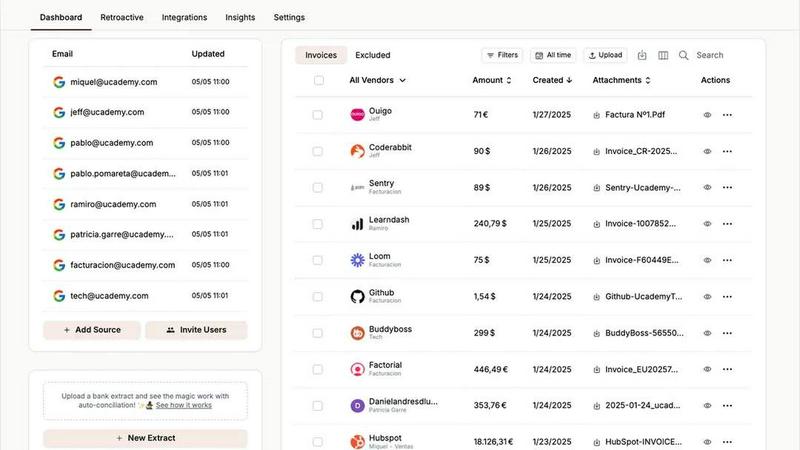
Tailride automates invoice and receipt management from emails and portals, saving accountants hundreds of hours.
Last updated: February 28, 2026
Visual Comparison
Dokta

Tailride
Feature Comparison
Dokta
Automated Invoice Management
Dokta simplifies invoice management through an automated process that allows users to upload documents in various formats such as photos, scans, or PDFs. The platform's AI swiftly analyzes the document, extracting critical details like amounts, deadlines, and client information in under a minute. This efficiency reduces administrative burdens and enhances productivity.
Professional Invoicing and Contract Creation
With Dokta, users can create professional invoices and quotes with just a few clicks. The platform also supports the generation of contracts with monthly billing options, making it easier for freelancers and entrepreneurs to maintain a steady cash flow while ensuring their documentation meets professional standards.
Real-Time Financial Tracking
Dokta provides users with a real-time overview of their financial health, showcasing billed and collected revenue, outstanding amounts, and VAT information. The intuitive dashboard allows users to visualize their financial situation over the past 12 months, enabling better decision-making and financial planning.
Enhanced Client and Supplier Management
The platform enriches client and supplier information automatically, including SIRET number validation and payment scoring. This feature helps users maintain a complete historical record for each entity, ensuring they are well-informed about client relationships and payment behaviors.
Tailride
Inbox Scanning
Tailride's inbox scanning feature allows users to automatically monitor their email accounts for incoming invoices and receipts. The platform can detect various formats, including PDFs and images, ensuring that no document goes unaccounted for. This feature saves time and increases efficiency by organizing invoices automatically, allowing users to focus on more valuable tasks.
Online Portals
With Tailride, users can extract invoices from various online portals effortlessly. This feature simplifies the accounting process by enabling business owners to gather financial documents directly from websites without needing manual retrieval. The platform's capability to connect with multiple online services ensures comprehensive coverage for all invoice types.
AI Processing
Tailride leverages sophisticated AI processing to enhance the accuracy of document recognition and data extraction. This feature allows the platform to categorize invoices automatically based on customizable rules, significantly reducing the need for manual oversight. Users can tailor the AI to meet their specific accounting needs, ensuring a personalized workflow that aligns with their business requirements.
Reconciliation
The reconciliation feature in Tailride facilitates seamless matching of transactions with invoices. This capability not only streamlines the financial review process but also helps identify any missing documents. By ensuring that all financial records are accurately aligned, users can maintain transparency and accountability in their accounting practices.
Use Cases
Dokta
Freelance IT and Consulting
For freelance IT professionals and consultants, Dokta streamlines contract management and invoicing by automating the billing process. Users can set up contracts with automatic monthly invoicing, allowing them to focus on their projects while Dokta handles the administrative tasks.
Creative Freelancers
Creative freelancers can utilize Dokta to manage their projects seamlessly from the first quote to the final payment. With the ability to send quotes with acceptance links and convert quotes into invoices in one click, the platform simplifies the workflow for creatives and ensures timely payments.
Auto-Entrepreneurs
For auto-entrepreneurs, Dokta offers a straightforward solution for generating compliant invoices and tracking payments. Users receive alerts for important URSSAF deadlines, allowing them to stay organized and compliant without unnecessary stress.
Small to Medium-Sized Businesses
SMBs can leverage Dokta to centralize their document management and financial tracking. The platform's capabilities in automating reminders for unpaid invoices and providing real-time financial insights help businesses maintain a healthy cash flow and improve overall efficiency.
Tailride
For Accountants Managing Multiple Clients
Accountants juggling numerous clients benefit immensely from Tailride's automated invoice extraction and organization features. By connecting all relevant email accounts, accountants can quickly retrieve necessary documents without sifting through hundreds of emails, thus improving overall productivity and client satisfaction.
For Small Business Owners
Small business owners can use Tailride to simplify their expense tracking and invoice management. By automating the capture of receipts and invoices from various sources, they can focus on growing their business rather than getting bogged down by administrative tasks.
For Teams Collaborating on Financial Projects
Tailride is particularly useful for teams that need to collaborate on financial projects. The ability to invite colleagues to connect their inboxes fosters teamwork and ensures that everyone has access to the latest financial documents, reducing the chance of miscommunication and errors.
For Freelancers and Contractors
Freelancers and contractors can leverage Tailride to keep track of their invoices and expenses more efficiently. The platform allows them to store and organize documents in a centralized location, making it easier to manage finances and prepare for tax filings without the hassle of manual tracking.
Overview
About Dokta
Dokta is a revolutionary AI-powered document management platform designed specifically for freelancers, solo entrepreneurs, auto-entrepreneurs, and small to medium-sized businesses (SMBs). This user-friendly tool streamlines the management of various document types, including invoices, quotes, and contracts, by utilizing advanced AI technology to read, classify, and extract essential data in less than 60 seconds. Dokta supports the complete document lifecycle, allowing users to create professional invoices and quotes effortlessly, track payments, automate reminders for unpaid invoices, manage contracts and deadlines, and even generate tasks directly from their documents. By centralizing document management, Dokta eliminates the hassle of lost files and missed deadlines, giving users more time to focus on their core business activities. With features that build a comprehensive client database and track cash flow in real time, Dokta makes financial management simple and effective. Whether you are a freelance developer, a consultant, a trades contractor, or a growing SMB, Dokta places your documents at the center of your operations, all managed by intelligent AI technology.
About Tailride
Tailride is an innovative AI-powered accounting automation platform designed to streamline the tedious process of invoice and receipt management. It connects seamlessly with your email inbox, enabling automatic detection, extraction, and processing of invoices and receipts from emails and attachments. Tailride utilizes advanced intelligent document recognition technology, ensuring that all data is accurately captured and organized. The platform is ideal for businesses of all sizes, particularly accountants and financial professionals managing multiple clients. Its main value proposition lies in its ability to save users hundreds of hours by eliminating manual data entry, reducing the risk of errors, and providing a comprehensive view of financial documents. With features like a Chrome extension for quick invoice extraction from over 20 popular platforms, customizable AI categorization rules, and robust integrations with accounting software such as QuickBooks and Xero, Tailride empowers users to focus on strategic financial management rather than clerical tasks.
Frequently Asked Questions
Dokta FAQ
What types of documents can I upload to Dokta?
Dokta supports a variety of document formats, including photos, scans, and PDFs. Users can upload invoices, quotes, contracts, and more, allowing for comprehensive document management.
How quickly can Dokta analyze a document?
Dokta's advanced AI engine can read and analyze documents in less than 60 seconds, extracting critical data such as amounts, deadlines, and client details efficiently.
Is Dokta compliant with data protection regulations?
Yes, Dokta is fully compliant with GDPR regulations, ensuring that all user data is securely managed and hosted in Europe (AWS).
What is the cost to use Dokta?
Dokta offers a free tier that allows users to manage up to 15 documents per month. Paid plans start at €9 per month, providing additional features and higher document limits tailored to freelancers and SMBs.
Tailride FAQ
How does Tailride handle different email clients?
Tailride is designed to work with all major email clients, including Gmail, Outlook, and any service that supports IMAP. This flexibility allows users to integrate their existing email accounts seamlessly, ensuring a smooth experience regardless of their preferred email platform.
Can I track past invoices with Tailride?
Yes, Tailride allows users to retroactively search for past invoices within their connected email accounts. You can filter searches by date ranges, making it easy to locate specific documents whenever needed.
Is Tailride suitable for large organizations?
Absolutely. Tailride is designed to scale with your business needs, making it an excellent choice for large organizations and accounting firms handling multiple clients. Its robust features ensure that it can accommodate diverse accounting requirements efficiently.
How does the Chrome extension improve my workflow?
The Tailride Chrome extension allows users to extract invoices from over 20 popular platforms with just one click. This feature streamlines the process of collecting financial documents, saving significant time and reducing the chances of missing important invoices while navigating different online services.
Alternatives
Dokta Alternatives
Dokta is an AI-powered document management platform tailored for freelancers, solo entrepreneurs, auto-entrepreneurs, and small to medium-sized businesses (SMBs). It streamlines the management of various documents such as invoices, quotes, and contracts by automatically reading, classifying, and extracting crucial data in under a minute. As users become increasingly reliant on technology for efficiency, they often seek alternatives to Dokta for reasons such as pricing, specific feature sets, or integration with other platforms that better suit their business needs. When searching for alternatives to Dokta, users should consider factors such as the platform's pricing structure, the range of features offered, ease of use, and compatibility with existing systems. Additionally, it is essential to evaluate the level of customer support provided, as well as any potential for customization that aligns with individual business workflows. A suitable alternative should not only meet immediate document management needs but also support future growth and operational efficiency.
Tailride Alternatives
Tailride is an advanced AI-powered accounting automation platform designed to streamline the tedious process of managing invoices and receipts. By integrating seamlessly with your email inbox and various web portals, it intelligently detects and extracts financial documents, facilitating smoother accounting workflows. Tailride belongs to the Business & Finance category, offering features like customizable AI rules for categorization and bank reconciliation, making it a valuable tool for both individuals and businesses. Despite its impressive capabilities, users may seek alternatives to Tailride for various reasons, including pricing considerations, specific feature requirements, or compatibility with different platforms. When looking for an alternative, it is crucial to assess factors such as ease of use, integration options, scalability, and the flexibility of automation features. Understanding your specific needs will help you make an informed decision that enhances your accounting processes.