
SureThing.io vs TinyFast
Side-by-side comparison to help you choose the right tool.

SureThing.io
SureThing.io is your trusted autonomous business partner, seamlessly managing tasks and remembering your unique preferences while you rest.
Last updated: March 19, 2026

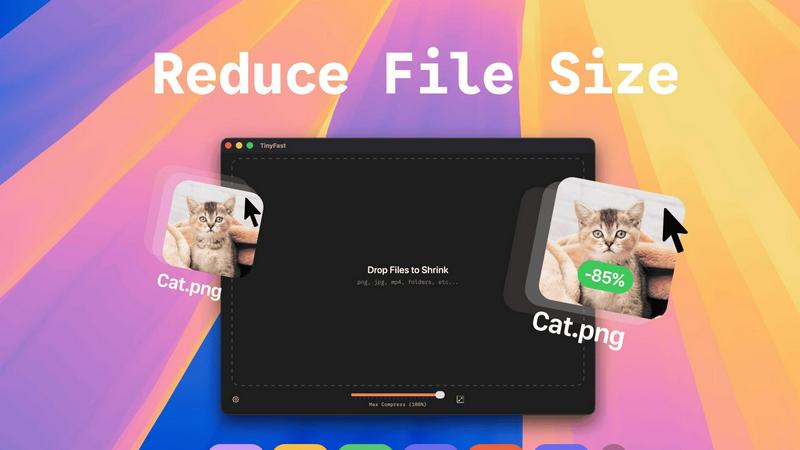
TinyFast is a private Mac app that swiftly compresses images, videos, and documents locally for ultimate privacy and.
Last updated: February 28, 2026
Visual Comparison
SureThing.io

TinyFast
Feature Comparison
SureThing.io
Autonomous Operation
SureThing is designed to operate independently, actively managing your tasks without the need for constant input. This feature allows you to focus on high-priority projects while SureThing handles the routine aspects of your work life.
State-of-the-Art Agentic Memory
With its advanced memory capabilities, SureThing keeps track of your goals, preferences, and communication style over weeks and months. This means that as you continue to work with SureThing, it requires less explanation and can anticipate your needs more effectively.
Integrated Project Management
SureThing not only monitors your schedule but also tracks ongoing projects across various platforms. It serves as a central hub for your tasks, ensuring nothing falls through the cracks and that you are always aware of your project statuses.
Secure and Compliant Architecture
Built with enterprise-level security in mind, SureThing is SOC 2 certified and Google CASA Tier 2 compliant. This commitment to security ensures that your sensitive information is protected, allowing you to trust SureThing with your most critical tasks.
TinyFast
Batch & Drag-Drop Shrink
With TinyFast, users can easily compress entire folders in a single action. Simply drop a folder containing multiple files into the app, and within seconds, receive optimized outputs for all included files. This feature significantly enhances productivity by allowing bulk processing without the need for multiple individual uploads.
Blazing-Fast Compression
TinyFast employs optimized native engines that ensure rapid file compression, allowing users to shrink large files in mere seconds. Unlike online tools, which often require waiting for uploads and downloads, TinyFast delivers immediate results, making it an ideal solution for users who value time and efficiency.
Resize Resolution
Users can set TinyFast to automatically resize the resolution of images and videos during compression. This feature enables professionals to maintain the right balance between quality and file size, ensuring that their digital assets are not only optimized but also visually appealing for their intended use.
100% Local & Private
TinyFast prioritizes user privacy by ensuring that all file processing remains on the device. Users can rest easy knowing that their files are never uploaded to cloud servers or third-party websites. This design commitment to privacy empowers users to work with confidential documents without fear of data exposure.
Use Cases
SureThing.io
Streamlined Communication
For busy professionals, SureThing can handle email correspondence by drafting replies that reflect your voice and style. This means you can maintain effective communication without being tied to your inbox.
Efficient Scheduling
SureThing takes the hassle out of scheduling by managing your calendar, finding optimal meeting times, and sending invites. This allows you to spend more time on important tasks rather than back-and-forth scheduling.
Project Tracking for Entrepreneurs
Solo founders can rely on SureThing to track their go-to-market launches and ongoing projects. By managing various components of these processes, SureThing enables entrepreneurs to focus on execution rather than administration.
Continuous Learning and Adaptation
SureThing's memory feature means that it learns from your interactions over time, which enhances its performance and efficiency. This continuous learning process allows it to become an increasingly valuable asset in your daily operations.
TinyFast
Optimizing Digital Assets for Web Development
Web developers often deal with large image and video files that can slow down website loading times. TinyFast allows them to compress these assets locally, ensuring that websites remain fast and responsive while maintaining high visual quality.
Streamlining Content Creation
Content creators, including bloggers and social media managers, frequently require optimized images and videos for their posts. With TinyFast, they can quickly compress and resize their media files without needing to rely on internet connectivity, allowing for a more efficient workflow.
Preparing Files for Client Presentation
Designers and professionals who present work to clients need to ensure that their files are not only high-quality but also easily shareable. TinyFast enables them to compress large files while keeping them secure, making it easier to send presentations via email or upload to shared drives.
Managing Confidential Projects
For professionals handling sensitive or proprietary information, TinyFast provides a reliable way to compress files without the risk of data breaches. By keeping everything local, users can confidently manage confidential projects, knowing their data is protected.
Overview
About SureThing.io
SureThing.io is an innovative autonomous AI agent designed to enhance productivity by working on your behalf around the clock. Unlike traditional AI chatbots that rely on user prompts, SureThing operates proactively, seamlessly integrating into your daily routine. It monitors your inbox, drafts replies in your unique voice, manages your calendar, tracks ongoing projects, and interacts with connected applications, allowing you to maintain focus on more critical tasks. The key differentiator of SureThing is its state-of-the-art memory system, which retains your preferences, patterns, contacts, and goals, ensuring it remembers context from one session to the next. This persistent memory enables SureThing to adapt to your working style, reducing the need for constant re-explanation. Built with a focus on reliability, SureThing is SOC 2 certified and Google CASA Tier 2 compliant, making it a trusted partner for users demanding high security and performance. Its early adopters include tech leaders and solo entrepreneurs who appreciate the efficiencies it brings to their workflows, earning it a reputation as "the Mac of AI agents."
About TinyFast
TinyFast is a groundbreaking macOS application designed to empower users by eliminating their reliance on online file compression services, which often expose sensitive data to privacy risks. This powerful, local file shrinker supports a diverse range of formats—including images (PNG, JPEG, WebP, GIF, SVG), videos (MP4, MOV), documents (PDF), and audio files (MP3). By processing files directly on your Mac, TinyFast guarantees a seamless, secure, and incredibly fast workflow. Users can simply drag and drop files into the app and receive optimized versions almost instantly, all while ensuring that no data leaves the secure confines of their local machine. Catering specifically to developers, designers, content creators, and professionals who handle confidential assets, TinyFast addresses critical pain points such as privacy concerns, dependency on internet connectivity, and the slow upload/download times often associated with third-party services. With its focus on local processing, TinyFast ensures total privacy, constant availability, and remarkable compression speeds—making it an indispensable tool for anyone looking to optimize their digital assets efficiently and responsibly.
Frequently Asked Questions
SureThing.io FAQ
How does SureThing.io ensure my data privacy?
SureThing is SOC 2 certified and Google CASA Tier 2 compliant, which means it adheres to strict security protocols to protect your data. Your information is managed with the highest standards of privacy and security.
Can I customize SureThing's responses?
Yes, SureThing adapts to your unique communication style and preferences. The more you interact with it, the better it learns to draft responses that truly reflect your voice.
Is SureThing suitable for team collaboration?
Absolutely! While SureThing is excellent for individual users, it can also be integrated into team workflows to enhance collaboration, streamline communication, and manage group projects effectively.
What types of tasks can SureThing manage?
SureThing can handle a variety of tasks including email management, scheduling, project tracking, and even interfacing with other applications to ensure your workflow remains efficient and uninterrupted.
TinyFast FAQ
How does TinyFast ensure privacy?
TinyFast processes all files locally on your Mac, meaning no data is uploaded to cloud servers or third-party sites. This design guarantees that your files remain private and secure.
What types of files can I compress with TinyFast?
TinyFast supports a wide variety of file formats, including images (PNG, JPEG, WebP, GIF, SVG), videos (MP4, MOV), documents (PDF, DOCX), and audio files (MP3), making it a versatile tool for all your compression needs.
Is TinyFast easy to use for beginners?
Absolutely! TinyFast features a straightforward drag-and-drop interface that makes it incredibly easy for users of all skill levels to compress their files quickly and efficiently without any technical knowledge.
What are the system requirements for TinyFast?
TinyFast is designed exclusively for macOS, ensuring optimal performance on Apple devices. Users should check the app's official website for the latest system requirements and compatibility information.
Alternatives
SureThing.io Alternatives
SureThing.io is a fully autonomous business management tool that leverages advanced AI technology to serve users 24/7. Designed to enhance productivity, SureThing operates proactively, managing emails, scheduling, and project tracking while adapting to individual user preferences. As a trusted agent, it stands out by continuously learning and maintaining context across interactions, providing a reliable solution for busy professionals. Users often seek alternatives to SureThing.io for various reasons, including pricing, feature sets, or specific platform compatibility. When evaluating alternatives, it is essential to consider factors such as reliability, the ability to integrate with existing workflows, and the level of support provided. A good alternative should offer similar functionalities while aligning with the unique needs and preferences of the user.
TinyFast Alternatives
TinyFast is an innovative macOS application designed for the efficient local compression of images, videos, documents, and audio files. As a tool that prioritizes user privacy and speed, it appeals to a wide range of professionals, including developers, designers, and content creators who require secure file handling. Users often seek alternatives to TinyFast due to varying needs such as specific feature sets, pricing differences, or compatibility with different operating systems. When selecting an alternative, it's essential to consider factors like processing speed, data security, platform compatibility, and user-friendly interfaces that enhance overall productivity. Choosing an alternative should also involve assessing the level of local processing versus cloud-based solutions, especially for users who prioritize data privacy. The ease of use and the ability to handle multiple file types efficiently can greatly influence the decision-making process. Furthermore, evaluating customer support, update frequency, and community engagement can provide insight into the reliability and longevity of the alternative solution in question.