
Dokie AI vs SimpleDraw
Side-by-side comparison to help you choose the right tool.

Dokie AI
Dokie AI empowers users to effortlessly create stunning professional presentations in minutes using advanced AI technology.
Last updated: March 19, 2026

SimpleDraw
SimpleDraw is a free online tool for creating precise scale drawings and floor plans with professional ease.
Last updated: March 1, 2026
Visual Comparison
Dokie AI

SimpleDraw
Feature Comparison
Dokie AI
AI Generate PPT
This feature allows users to produce a complete slide deck based solely on a plain text description of their topic. Dokie AI intelligently analyzes the input and generates slides with professional layouts, relevant charts, and engaging content, saving users valuable time and effort in the presentation creation process.
AI Beautify PPT
With this functionality, users can upload existing presentations, and Dokie AI will enhance their design. The AI beautifies the slides by fixing layouts, applying professional styling, and ensuring that the presentation's content remains intact, transforming ordinary slides into stunning visual displays.
Speech Notes Generation
Dokie AI automatically generates detailed speaker notes for each slide, equipping users with comprehensive talking points to aid in their delivery. This feature enhances the overall presentation experience, allowing presenters to engage their audience effectively and confidently.
Document-to-PPT Conversion
This versatile feature enables users to convert various document formats, including PDFs and Word documents, into PowerPoint presentations seamlessly. By transforming existing content into slides, Dokie AI simplifies the workflow for users who need to quickly create presentations from pre-existing materials.
SimpleDraw
Dedicated Floor Plan Mode
SimpleDraw features a specialized Floor Plan Mode tailored for architectural visualization. This mode allows users to intuitively draw walls and add standardized doors and windows with single clicks, streamlining the creation of accurate room, apartment, and house layouts. A comprehensive library of interior fixtures for kitchens, bathrooms, living rooms, and bedrooms is available to populate plans. Real-time measurements update dynamically as you adjust elements, ensuring every dimension is precise and to scale, all within a completely free, browser-based environment.
Intelligent Smart Alignment System
The tool incorporates a sophisticated Smart Alignment System that assists users in placing points and lines with exact precision. As you move your mouse, the system intelligently snaps to logical points and aligns to axes, providing clear visual feedback. For ultimate control, you can zoom in for finer detail or use keyboard shortcuts to lock movements to strictly vertical or horizontal axes. This feature eliminates the frustration of freehand inaccuracy, making technical drawing feel intuitive and assured.
Flexible Zoom & Non-Destructive Editing
SimpleDraw provides complete creative control through flexible zoom capabilities and 100% non-destructive editing. You can zoom to any level of detail, with the tool's alignment precision adapting accordingly. Every element—lines, shapes, fixtures—can be modified, adjusted, moved, or deleted at any stage without damaging the rest of the drawing. Robust undo/redo functions and the ability to group, copy, and paste elements streamline the workflow, making iteration and experimentation effortless.
Comprehensive Measurement & Unit System
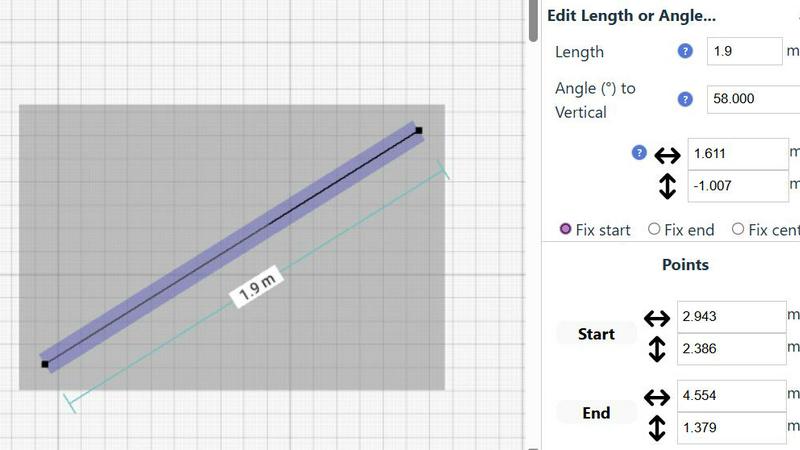
Accuracy is paramount, and SimpleDraw delivers with a comprehensive measurement system. Users have full control over which dimensions are displayed on their drawing. The tool supports both metric and standard US units (feet and inches), catering to a global audience. Contextual measurements appear dynamically as you work, and for ultimate precision, any element's position, length, or angle can be input directly via keyboard, ensuring the final plan matches your exact specifications.
Use Cases
Dokie AI
Business Presentations
Dokie AI is ideal for business professionals who need to create impactful presentations for meetings, pitches, or reports. The tool's ability to generate polished slides rapidly allows users to focus on delivering their message rather than getting bogged down in design details.
Educational Lectures
Educators can leverage Dokie AI to prepare engaging lectures and presentations for their classes. The AI-generated slide decks can help convey complex information clearly and visually, enhancing the learning experience for students.
Marketing Campaigns
Marketers can utilize Dokie AI to create presentations that showcase campaign strategies, results, and market analysis. The tool's features enable them to produce visually appealing slides that captivate and inform stakeholders.
Startup Pitches
Startup founders can use Dokie AI to develop compelling pitch decks that highlight their business ideas and value propositions. The AI's capabilities help ensure that the presentations are professional and persuasive, increasing the chances of securing investment.
SimpleDraw
Home Renovation & DIY Project Planning
Homeowners and DIY enthusiasts can use SimpleDraw to meticulously plan renovations, from kitchen and bathroom remodels to room additions. By creating accurate scale drawings, they can experiment with layouts, visualize where new fixtures and furniture will fit, and generate precise plans to guide their work or communicate with contractors, preventing costly measurement mistakes before any physical work begins.
Interior Design & Furniture Layout
Interior designers and individuals redecorating their spaces can leverage the tool to experiment with furniture arrangements and spatial design. You can draft room layouts, test different furniture configurations, and ensure that new pieces will fit perfectly and comply with traffic flow and design principles. This visual planning step saves time, money, and the physical effort of moving heavy items repeatedly.
Real Estate & Property Listing Visualization
Real estate agents, landlords, and property managers can create clear, professional floor plans for listings, rental advertisements, and sales brochures. Accurate scale drawings help potential buyers or tenants understand the flow and proportions of a space remotely, setting realistic expectations and enhancing the marketing appeal of any property, from studio apartments to large family homes.
Educational Projects & Small Business Planning
Students in design, architecture, or related fields can use SimpleDraw for academic projects and presentations without needing complex software licenses. Similarly, small business owners can plan retail layouts, office configurations, or restaurant seating charts. The tool provides a professional output suitable for presentations, planning permits, or guiding fit-out contractors, all at no cost.
Overview
About Dokie AI
Dokie AI is a groundbreaking AI-powered presentation maker designed for business professionals, educators, marketers, and startup founders. It simplifies the process of creating professional-grade presentations without the need for advanced design skills. Utilizing the advanced capabilities of Claude Opus 4.6, Dokie AI automates various aspects of presentation design, including content structure, layout selection, typography, and visual design. This innovative tool offers multiple modes to cater to different user needs: Generate mode allows users to create presentations from scratch based on text prompts; Beautify mode enhances existing presentations; Speech mode adds detailed speaker notes; and document-to-PPT conversions facilitate seamless transitions from various formats. By streamlining the presentation creation process, Dokie AI empowers users to focus on content and delivery, ensuring their presentations are not only visually appealing but also impactful.
About SimpleDraw
SimpleDraw is a revolutionary, free online tool that democratizes the creation of precise and accurate scale drawings. It serves as a powerful yet intuitive platform designed to bridge the gap between complex, expensive CAD software and rudimentary pen-and-paper sketches. By focusing laser-sharp attention on ease of use, SimpleDraw offers a curated suite of powerful functionalities that empower a vast audience to produce professional-grade technical drawings without a steep learning curve. Its core value proposition is unparalleled accessibility; it requires no software downloads, installations, or user registration, functioning entirely within a modern web browser. This makes it an indispensable solution for homeowners planning DIY renovations, interior designers sketching initial concepts, real estate agents visualizing property layouts, students tackling design projects, and small business owners planning commercial spaces. By seamlessly combining the flexibility of digital editing with the rigorous precision of scale drafting, SimpleDraw transforms abstract measurements and ideas into clear, actionable, and professional visual plans. It effectively makes spatial design, planning, and visualization an approachable and empowering task for everyone, regardless of their technical background or budget.
Frequently Asked Questions
Dokie AI FAQ
What types of presentations can I create with Dokie AI?
Dokie AI allows users to create various types of presentations, including business reports, educational lectures, marketing strategies, and startup pitch decks, catering to a wide range of professional needs.
How does Dokie AI enhance existing presentations?
Using the AI Beautify feature, Dokie AI enhances existing presentations by fixing layouts, applying professional design elements, and ensuring that the original content remains intact while improving overall aesthetics.
Can I generate speaker notes for my presentations?
Yes, Dokie AI automatically generates detailed speaker notes for each slide, providing users with essential talking points that help enhance their presentation delivery and maintain audience engagement.
Is Dokie AI suitable for non-designers?
Absolutely! Dokie AI is specifically designed for users without advanced design skills. Its intuitive AI technology automates the design process, allowing anyone to create professional-grade presentations effortlessly.
SimpleDraw FAQ
Is SimpleDraw really free to use?
Yes, SimpleDraw is completely free to use. There are no hidden fees, subscription tiers, or premium feature paywalls. The core platform, including the Floor Plan Mode, smart alignment tools, and comprehensive measurement system, is available at no cost without requiring any user registration or software download. It is funded and developed with the goal of making scale drawing accessible to everyone.
Do I need to download or install any software?
No installation or download is required. SimpleDraw is a fully web-based application that runs directly in your modern internet browser (like Chrome, Firefox, Safari, or Edge). You can start drawing immediately by visiting the website, with no need to install plugins or additional software, ensuring instant access from any device with an internet connection.
What kind of drawings can I create with SimpleDraw?
SimpleDraw is specifically optimized for creating accurate scale drawings and floor plans. This includes detailed layouts for kitchens, bathrooms, bedrooms, and entire houses or apartments. You can also create furniture plans, office layouts, and basic architectural sketches. It is designed for any project that requires precise measurements and a clear visual representation of space.
Can I save and share my drawings?
Yes, SimpleDraw allows you to save your work directly to your device's local storage. You can also export your drawings in common image formats to share with others via email, messaging apps, or to print for physical reference. The tool is designed for practical use, enabling you to return to your project later or collaborate by sharing visual plans easily.
Alternatives
Dokie AI Alternatives
Dokie AI is a leading AI presentation maker designed to streamline the process of creating professional PowerPoint slides. It caters to various users, including business professionals, educators, marketers, and startup founders, by leveraging advanced AI technology to automate content generation, design, and layout. This innovation allows users to produce polished presentations quickly and efficiently, without the need for extensive design skills. Many users seek alternatives to Dokie AI for several reasons, including pricing concerns, feature availability, or specific platform compatibility that better meets their needs. When searching for alternatives, consider key factors such as the ease of use, the range of features offered, and customer support options. Additionally, evaluating the overall value in relation to your specific presentation needs will help ensure you select the most suitable tool for your projects.
SimpleDraw Alternatives
SimpleDraw is a free, web-based application within the category of digital design and drafting tools. It specializes in creating accurate scale drawings and floor plans, positioning itself as an accessible middle ground between basic sketching and complex computer-aided design software. Its core mission is to make precise spatial visualization available to anyone with a web browser, without the barriers of cost or a steep learning curve. Users often explore alternatives to any software tool for a variety of reasons. Some may require more advanced features for professional engineering or architectural work, while others might need offline functionality or integration with specific project management ecosystems. Considerations like team collaboration capabilities, the need for 3D modeling, or a preference for a downloadable desktop application can also prompt a search for different solutions that align with specific project demands and workflows. When evaluating alternatives, it's crucial to assess your primary needs. Consider the complexity of your projects, your required level of precision, and whether you need specialized object libraries or rendering capabilities. Also, factor in your technical comfort, budget for potential subscriptions, and the importance of platform accessibility—whether you need mobile apps, cloud saving, or software that operates without an internet connection. The ideal tool balances necessary functionality with an interface that you can use efficiently.