
RemoveTexts vs TextSharp | Text Image Enhance
Side-by-side comparison to help you choose the right tool.

RemoveTexts
RemoveTexts is an AI tool that effortlessly removes text from images in seconds, making editing simple and accessible for everyone.
Last updated: March 11, 2026

TextSharp | Text Image Enhance
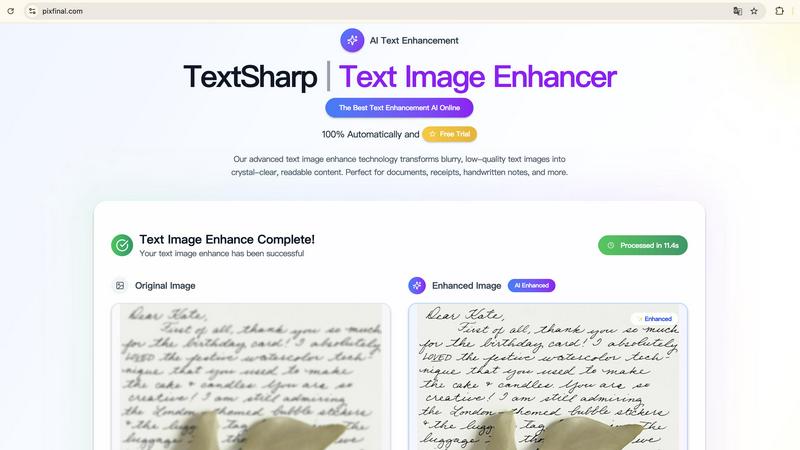
Transform blurry text images into clear, readable content with TextSharp's fast and secure AI enhancement tool.
Visual Comparison
RemoveTexts

TextSharp | Text Image Enhance
Feature Comparison
RemoveTexts
Paint to Remove
This feature provides users with precise control over the text removal process. By simply brushing over specific areas of text, users can accurately select the elements they want to erase. This ensures that only the intended text is removed, leaving the surrounding image intact.
Auto Remove All
For those who prefer a more automated approach, the Auto Remove All feature allows the AI to detect and remove every text element in the image with one click. This is particularly useful for users who need to process multiple images quickly and efficiently without manual intervention.
Edit & Replace Text
RemoveTexts goes beyond simple text removal by allowing users to edit existing text. This feature enables users to replace text in images while matching the original font style, making it perfect for those looking to update or customize visuals without starting from scratch.
Remove Objects
In addition to erasing text, RemoveTexts includes a powerful object removal feature. Users can easily remove unwanted items, logos, or visual elements from their images, enhancing the overall quality and focus of the composition.
TextSharp | Text Image Enhance
Instant Processing
TextSharp offers instant processing for your images, allowing you to enhance text clarity in seconds. The tool is optimized with advanced AI technology, making it incredibly fast and efficient. Users can simply upload their images and receive enhanced text almost immediately, which is perfect for those on tight deadlines or needing quick results.
High-Quality Results
This text image enhancement tool guarantees professional-grade results every time. Unlike basic tools that may produce distorted or misaligned text, TextSharp's proprietary algorithm enhances clarity and readability, ensuring that the restored text is accurate and visually appealing. This feature is essential for users who require high fidelity in their text restoration.
Privacy First
TextSharp prioritizes user privacy by ensuring that all images are processed securely and are never stored. After enhancement, images are automatically deleted, giving users peace of mind regarding their sensitive data. This commitment to privacy makes TextSharp a trustworthy choice for professionals handling confidential information.
Versatile Image Format Support
TextSharp supports multiple image formats, including JPG, PNG, and WEBP, up to 50MB. This versatility allows users to upload various types of text-heavy images, ensuring that they can enhance a wide range of documents, receipts, and handwritten notes. The tool’s adaptability to different formats makes it a comprehensive solution for all text enhancement needs.
Use Cases
RemoveTexts
Cleaning Screenshots
RemoveTexts is an invaluable tool for anyone who frequently shares screenshots. Users can effortlessly remove unwanted text, such as chat bubbles or time stamps, ensuring that the focus remains on the content being shared.
Designing Marketing Materials
Marketers and designers utilize RemoveTexts to create clean and professional visuals. By removing watermarks or other distractions from product images, they can present their offerings in the best light possible, enhancing brand perception.
Redacting Sensitive Information
Legal professionals and businesses often need to redact sensitive information from documents and images. RemoveTexts provides a quick solution for removing text while maintaining the integrity of the background, ensuring compliance with privacy standards.
Enhancing Social Media Posts
Social media managers can leverage RemoveTexts to optimize their posts. Whether it's removing unwanted captions or adjusting text overlays, this tool allows for quick edits that enhance visual appeal and engagement on platforms like Instagram and Facebook.
TextSharp | Text Image Enhance
Professional Document Restoration
Professionals dealing with important documents can use TextSharp to restore scanned contracts and agreements to their original clarity. This ensures that all text is legible and accurately represented, which is crucial for legal and business communications.
Improved Receipt Clarity
Individuals and businesses can enhance faded receipts and expense proofs, making them suitable for accurate OCR export and record-keeping. This use case is especially valuable for accountants and business owners who need reliable documentation for financial purposes.
Enhanced Academic Notes
Students can benefit from TextSharp by clarifying handwritten lecture notes or scanned pages from textbooks. This allows for better readability and easier study sessions, helping students to retain information more effectively.
Clearer Visual Presentations
For creators and educators, TextSharp can enhance screenshots of chat logs, product details, or UI captures, making them suitable for presentations or tutorials. This ensures that all visual content is clear and professional, enhancing the overall quality of the material shared.
Overview
About RemoveTexts
RemoveTexts is a revolutionary AI-powered image editing tool designed to simplify the process of removing unwanted text from images. Functioning without the need for advanced skills or software like Photoshop, RemoveTexts allows users to upload any image and efficiently erase text elements in seconds. This tool is perfect for those who frequently deal with images containing watermarks, captions, or other textual overlays that detract from the visual appeal. With its intuitive interface, even novice users can achieve professional-grade results. The main value proposition of RemoveTexts lies in its ability to seamlessly reconstruct backgrounds after text removal, ensuring that the final image appears natural and untouched. Trusted by over 100,000 creators, marketers, and designers worldwide, RemoveTexts is an essential tool for anyone looking to enhance their visual content quickly and effectively.
About TextSharp | Text Image Enhance
TextSharp | Text Image Enhance is an advanced AI tool designed to transform blurry and low-quality text images into crystal-clear, readable content. Whether you are dealing with screenshots, scanned documents, receipts, or handwritten notes, this tool ensures that your text is restored to professional-quality clarity. What distinguishes TextSharp from other generic text enhancement tools is its proprietary AI algorithm, which intelligently sharpens text while preserving the original formatting and context. This makes it an ideal solution for professionals, students, and anyone needing fast and dependable text clarity. The tool is accessible online, eliminating the need for queues or unstable platforms. With TextSharp, users can rely on a durable and intelligent solution that consistently delivers high-quality results, ensuring that all textual content is both visually crisp and true to the original.
Frequently Asked Questions
RemoveTexts FAQ
What image formats does RemoveTexts support?
RemoveTexts supports JPG, PNG, and WebP formats, allowing users to upload images of various types for editing. The maximum file size accepted is 10 MB.
Is there a limit to how many images I can process?
There is no stated limit on the number of images you can process with RemoveTexts. Users can continuously use the tool to edit images as needed, making it highly efficient for bulk tasks.
Can I use RemoveTexts for commercial purposes?
Yes, RemoveTexts is suitable for commercial use. Many marketers and content creators utilize the tool to enhance images for advertisements, websites, and other promotional materials.
Does RemoveTexts leave any traces after text removal?
No, RemoveTexts uses advanced AI technology to ensure seamless background reconstruction, leaving absolutely no visible traces or artifacts after the text is removed. The results are professional and appear as if the text was never there.
TextSharp | Text Image Enhance FAQ
What is an image text enhancer and how does it work?
An image text enhancer is a specialized tool that transforms blurry, low-quality text images into clear, readable content. TextSharp utilizes advanced AI algorithms that enhance text clarity, reduce noise, and improve OCR accuracy. It is suitable for a variety of image types, including screenshots, scanned documents, and photos.
Which image formats work best with TextSharp?
TextSharp supports several image formats including PNG, JPG, JPEG, and WEBP, with a maximum file size of 50MB. These formats are ideal for text-heavy images, ensuring that users can enhance various types of documents, receipts, and handwritten notes effectively.
Is my image data stored or kept private with TextSharp?
TextSharp places a strong emphasis on user privacy. All images processed through the tool are temporary and are automatically deleted after enhancement. This ensures that users’ data remains confidential and secure throughout the enhancement process.
How quickly can I expect results from TextSharp?
Users can expect results in less than 5 seconds for each image processed. TextSharp's optimized AI technology allows for rapid enhancement, making it an efficient choice for users needing quick turnaround times on their text clarity improvements.