
Genstory vs Refbox
Side-by-side comparison to help you choose the right tool.

Genstory
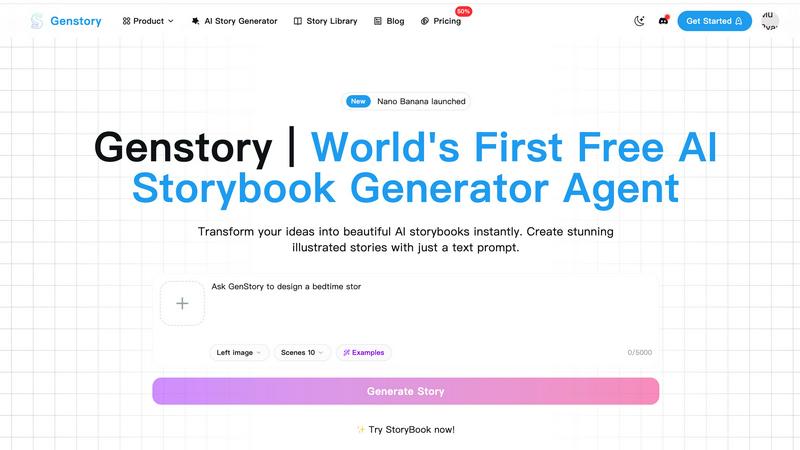
Transform your ideas into captivating novels, comics, and videos effortlessly with Genstory's powerful AI storytelling.
Last updated: February 27, 2026

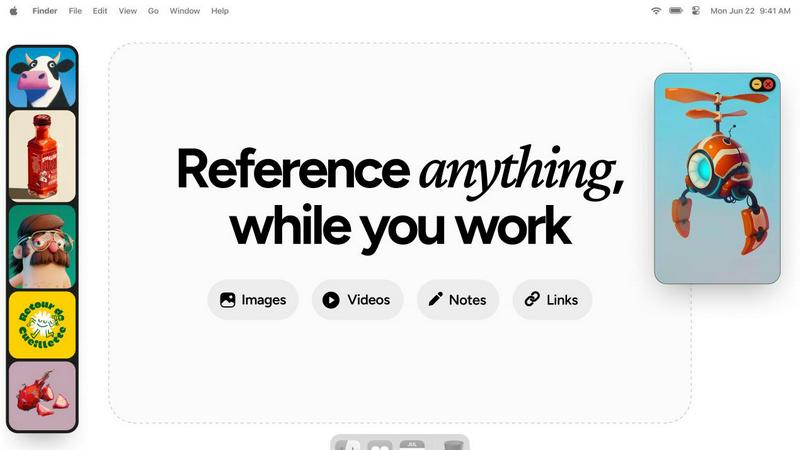
Refbox keeps your images, videos, and notes instantly accessible above your workspace for effortless reference.
Last updated: February 28, 2026
Visual Comparison
Genstory
Refbox
Feature Comparison
Genstory
Lightning-Fast Generation
GenStory is designed for speed, enabling users to complete the creation process—from text generation to illustration—in just seconds. This rapid turnaround allows for spontaneous storytelling, making it easy to capture fleeting ideas and moments of inspiration.
Simple and Intuitive Interface
With GenStory, there is no need for users to master complex commands or coding. Its user-friendly interface allows for natural conversation input, guiding the AI's storytelling process seamlessly. This ensures that anyone, regardless of technical skill, can create engaging stories effortlessly.
Multi-Dimensional Output
GenStory supports various formats for your creations, including PDF downloads and interactive web stories. This flexibility makes it easy to share your story with others, whether for personal enjoyment or educational purposes, and ensures that your creations can be printed or published as needed.
Beautiful Illustrations
Every story generated by GenStory comes with AI-crafted artwork that enhances the narrative. These vibrant illustrations not only bring the text to life but also engage readers visually, making the storytelling experience more immersive and enjoyable.
Refbox
Always-on-Top Floating Frames
Refbox's signature feature is its ability to create persistent, floating windows for any reference media. These frames can be resized, repositioned, and set to stay on top of all other applications, ensuring your inspiration never gets buried. You can work directly behind locked frames or minimize them temporarily, giving you complete control over your screen real estate while keeping references just a click away, eliminating the need to alt-tab or dig through folders.
Infinite Canvas & Instant Collections
Organize your references on a limitless digital canvas where you can spatially arrange images, videos, and notes for any project. The app allows you to create and switch between different Collections instantly with a single click, enabling you to segregate references for multiple clients, projects, or artistic phases effortlessly. This visual organization system makes moodboarding and project planning both efficient and intuitively satisfying.
Advanced Media Handling & Tools
Refbox goes beyond simple image display with a suite of powerful, creative-centric tools. It features frame-by-frame GIF playback, pixel-perfect rendering for pixel art, and the ability to take website screenshots directly by pasting a link. You can crop images, view SVG files, use a built-in color picker on any media to copy hex codes, and save or copy assets directly to your clipboard for use in other applications.
Streamlined Navigation & Shortcuts
Designed for speed, Refbox offers extensive keyboard shortcuts and navigation aids to keep your hands on the keyboard and your mind in the flow. You can swiftly swap through references in a frame using arrow keys, auto-hide your entire Refbox panel until you need it, and execute all major functions via customizable hotkeys. These thoughtful interactions minimize friction and save valuable time during intensive creative sessions.
Use Cases
Genstory
Personalized Bedtime Stories
Parents can use GenStory to create unique bedtime adventures that feature their child as the main character. By incorporating their child's favorite animals or magical settings, parents can ensure that each story is a special bonding experience that keeps children excited for storytime.
Educational Storytelling
Educators can leverage GenStory to craft visual narratives that explain complex concepts or inspire creativity in the classroom. The tool is particularly beneficial for ESL teachers, special education instructors, and those looking for creative writing prompts to motivate students.
Creative Writing Prompts
Aspiring authors and creatives can use GenStory as a source of inspiration. By inputting ideas or themes, writers can generate story outlines and narratives that spark further creativity, helping to overcome writer's block and enhancing their storytelling skills.
Collaborative Story Creation
GenStory allows for collaborative storytelling experiences, where multiple users can contribute to a single story. This feature is perfect for group activities, classrooms, or family storytelling sessions, fostering teamwork and shared creativity.
Refbox
Digital Illustration & Concept Art
Illustrators and concept artists can pin multiple character sketches, environment photos, and color palettes in floating frames around their drawing software. This allows for constant visual comparison and inspiration without leaving the canvas, facilitating accurate anatomy drawing, consistent lighting studies, and cohesive color scheme development directly from reference.
UI/UX & Web Design
Designers can keep live website screenshots, style guides, component libraries, and competitor analysis notes visible while working in Figma or Sketch. This enables precise alignment, typography matching, and layout inspiration, ensuring design decisions are informed and consistent without constantly switching browser tabs or digging through design system documents.
3D Modeling & Animation
3D artists and animators can float reference images for character orthographics, texture inspiration, or motion study videos directly above software like Blender or Maya. Having multiple angle views and action sequences always visible drastically improves modeling accuracy, texture application, and animation fluidity, streamlining the entire 3D creation pipeline.
Photography & Photo Editing
Photographers can use Refbox to display shot lists, client moodboards, and editing technique tutorials right next to Lightroom or Photoshop. During editing, they can keep color grading references or specific retouching examples pinned for direct emulation, ensuring the final product aligns perfectly with the planned creative vision and technical requirements.
Overview
About Genstory
GenStory is an innovative AI story generator that harnesses advanced AI technology to turn your creative ideas into beautifully illustrated digital picture books. This versatile tool caters to a wide range of users, including parents, educators, and aspiring storytellers, making storytelling accessible and enjoyable for everyone. By simply inputting a natural language prompt, users can generate complete storybooks that feature compelling narratives and stunning illustrations in mere seconds. GenStory's main value proposition lies in its ability to transform ordinary moments into extraordinary tales, fostering creativity and bonding experiences. With features that support both personal and educational storytelling, GenStory opens up a world of imaginative possibilities, allowing users to create unique bedtime stories, educational materials, and interactive narratives that can be shared and cherished.
About Refbox
Refbox is a revolutionary desktop application engineered to fundamentally transform the creative workflow by eliminating the disruptive context-switching inherent in traditional reference gathering. At its core, Refbox is a floating, always-on-top reference manager that allows creatives to pin essential media—including images, GIFs, videos, and rich-text notes—into resizable frames that hover persistently above any other application. This creates a seamless, layered workspace where inspiration and critical visual guides remain perpetually in view, directly alongside the primary creative tool, be it Photoshop, Blender, Figma, or a code editor. Designed for professionals who cannot afford fragmented focus, Refbox serves a wide spectrum of disciplines including graphic design, UI/UX design, 3D art, animation, illustration, photography, and motion graphics. Its value proposition is profound: it streamlines the creative process by providing instant, organized access to reference materials, thereby reducing cognitive load, accelerating execution, and fostering a state of deep, uninterrupted flow. By replacing a cluttered desktop or a browser full of tabs with a sleek, controllable, and infinite canvas of references, Refbox empowers artists and designers to work with greater speed, accuracy, and creative continuity.
Frequently Asked Questions
Genstory FAQ
How does GenStory work?
GenStory operates using advanced AI technology that processes natural language prompts. Users describe their story ideas, and the AI generates a complete digital storybook with text and illustrations in seconds.
Can I customize the stories generated by GenStory?
Yes, after the AI generates a story, users can review it and make adjustments to the text or illustrations as desired. This allows for personalization and tailoring to specific preferences or audiences.
What formats can I export my created stories in?
GenStory supports multiple output formats, including downloadable PDFs for printing and interactive web stories for sharing online. This versatility makes it easy to distribute your creations in various ways.
Is GenStory suitable for all ages?
Absolutely! GenStory is designed for users of all ages, including children, parents, educators, and aspiring authors. Its intuitive interface and diverse storytelling capabilities cater to a wide audience, making storytelling accessible and fun for everyone.
Refbox FAQ
What types of files does Refbox support?
Refbox supports a wide array of media formats essential for creative work. You can directly pin and view common image files (JPG, PNG, WEBP, SVG), video files (MP4, MOV), and GIFs. It also features rich-text notes for instructions and checklists. Furthermore, you can paste image URLs or website links to instantly create reference frames from online content.
How does the "always-on-top" feature work with other applications?
The always-on-top functionality is a core principle of Refbox. When you pin a reference, it creates a window that stays visually above other application windows. You can resize these frames and reposition them anywhere on your screen. For times when you need full access to an app behind, you can temporarily minimize individual frames or lock them, allowing you to click through to the software below while the reference remains in place.
Is there a free trial or version of Refbox?
Refbox operates on a straightforward, one-time purchase model. This means you pay a single fee for a perpetual license to the current version, without recurring subscriptions. This model is often preferred by professionals seeking predictable costs. Information on a trial version is not specified in the provided materials, so visiting the official Refbox website would provide the most current details on trial availability.
Can I use Refbox for collaborative projects or team workflows?
Based on the provided context, Refbox appears primarily designed as a powerful individual productivity tool to optimize a single user's desktop workflow. The features focus on personal reference management, organization, and rapid access. For collaborative aspects, users would typically share the final project files or exported reference collections, while using Refbox locally to manage their personal slice of the project's visual assets.
Alternatives
Genstory Alternatives
Genstory is an innovative AI-driven platform that allows users to create novels, comics, and cinematic videos with ease. Positioned within the realm of design tools, it transforms creative prompts into illustrated digital picture books, catering to a diverse audience that includes parents, educators, and aspiring storytellers. Users often seek alternatives to Genstory for various reasons, including pricing concerns, the need for additional features, or specific platform compatibility requirements. When evaluating alternatives, it is crucial to consider factors such as ease of use, the quality of output, customization options, and the overall support provided by the platform to ensure it meets individual creative needs.
Refbox Alternatives
Refbox is a specialized productivity application designed to streamline the creative workflow. It belongs to the category of reference management and workspace enhancement tools, allowing users to keep essential media and notes in floating, always-on-top windows. This eliminates the need for disruptive window switching, fostering a more focused and efficient environment for tasks like design, animation, and content creation. Users may seek alternatives to Refbox for various practical reasons. These can include budget constraints, the need for specific features not offered, compatibility with different operating systems, or a preference for a different user interface and workflow philosophy. The search for the right tool is highly personal, driven by an individual's unique project demands and working style. When evaluating alternatives, key considerations should include the core functionality of pinning reference material, support for different file types like images and videos, organizational capabilities, and overall ease of use. The ideal solution should integrate seamlessly into your existing process, reducing friction rather than adding complexity, to truly enhance your productivity and creative output.