
Receipt Generator vs Vibrantsnap
Side-by-side comparison to help you choose the right tool.

Receipt Generator
Create realistic custom receipts instantly with AI using over 400 free store templates for business or personal projects.
Last updated: April 4, 2026

Vibrantsnap
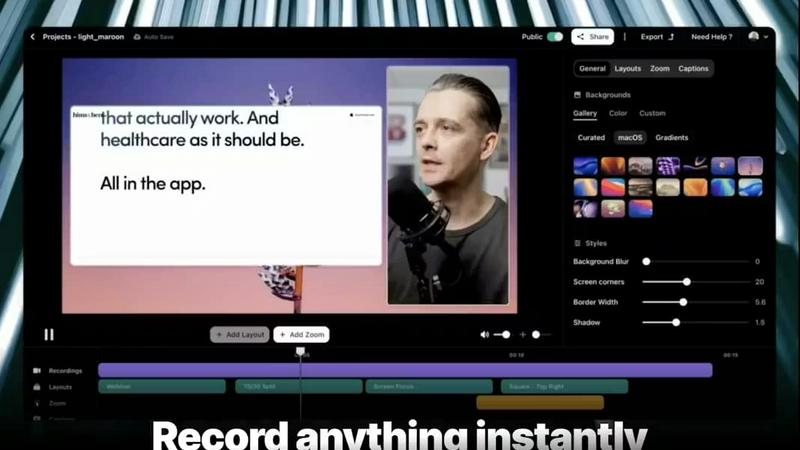
Transform screen recordings into polished, high-converting demo videos in minutes with Vibrantsnap's AI editing.
Last updated: February 28, 2026
Visual Comparison
Receipt Generator

Vibrantsnap
Feature Comparison
Receipt Generator
Extensive Template Library
Receipt Generator boasts a vast and ever-growing collection of over 400 professionally designed receipt templates. This library spans major retail chains like Walmart and Target, popular restaurants such as Starbucks and McDonald's, pharmacies like CVS and Walgreens, and grocery stores including Kroger and ALDI. Each template is crafted with authentic layouts, store-specific branding, and accurate formatting elements like loyalty program details, tax breakdowns, and payment sections, providing a perfect and legitimate starting point for any receipt creation need.
AI-Powered "Place in Scene"
This revolutionary feature leverages advanced artificial intelligence to solve a key challenge in digital receipt creation: realism. Instead of a flat digital file, users can generate a photorealistic image of their customized receipt placed on any surface. Simply select a scene—such as a wooden desk, kitchen counter, inside a wallet, or even crumpled in a pocket—and the AI seamlessly integrates the receipt with realistic lighting, shadows, and textures. This eliminates the need for physical printing and staging, creating perfect visuals for content, documentation, and presentations.
Full Customization and Drag-and-Drop Editor
The platform provides complete control over every detail of your receipt through an intuitive visual editor. Users can edit all text, prices, dates, and store information. The editor includes nine distinct block types (headers, line items, totals, barcodes, QR codes, dividers, etc.) that can be rearranged effortlessly via drag-and-drop. This allows for deep customization of the receipt's structure, fonts, spacing, and styling to match specific requirements without any technical or design expertise needed.
Instant, High-Resolution Export
Speed and quality are paramount. Once a receipt is customized, it can be downloaded instantly in high-resolution PNG or PDF format with a single click. There is no processing queue, lag, or mandatory account creation for basic use. Pro users enjoy unlimited, watermark-free downloads, ensuring the output is ready for professional use in expense reports, client invoices, digital content, or print materials without any compromise on quality or convenience.
Vibrantsnap
Built-in Video Analytics
Vibrantsnap comes equipped with robust video analytics that provide insights into viewer engagement. Users can see who watched their videos, how many times each video was viewed, and where viewer attention drops off. This data is invaluable for refining content strategy and optimizing user engagement, allowing creators to make informed decisions that drive growth.
Auto-Cut + Auto-Layout
With Vibrantsnap's Auto-Cut and Auto-Layout features, users can streamline their video production process significantly. Silences and filler words are automatically removed, and professional layouts are applied with just a couple of clicks. This ensures that videos are polished and ready to share in seconds, eliminating the need for complex editing skills and saving users precious time.
Magic Edit
The Magic Edit feature allows users to automatically clean their videos while enhancing audio quality with professional AI voiceovers. This ensures that every video not only looks great but also sounds crisp and clear, making it easier for viewers to focus on the message being conveyed. The combination of visual and auditory enhancements elevates the quality of the content significantly.
Call to Action Integration
Vibrantsnap makes it easy to add interactive call-to-action buttons to videos, such as "Book a call" or "Buy now." This feature encourages viewers to take immediate action after watching the video, helping to convert interest into tangible results. Users can also track clicks and engagement in real time, providing insights into the effectiveness of their calls to action.
Use Cases
Receipt Generator
Business Expense and Record Keeping
Small business owners, freelancers, and consultants can use Receipt Generator to create clear, professional records for bookkeeping, accounting, and tax preparation. It is ideal for reconstructing lost receipts, creating clean copies for digital filing, or generating mock receipts for projected business expenses and budget forecasts, ensuring organized and legitimate financial documentation.
Content Creation and Social Media
Digital marketers, influencers, and social media content creators can leverage the tool, especially the AI "Place in Scene" feature, to produce engaging visual content. This includes creating realistic product hauls, unboxing videos, budgeting tutorials, or humorous content about shopping experiences without needing to source or stage physical receipts, saving significant time and enhancing production value.
E-commerce and Resale Documentation
Online resellers on platforms like eBay, Poshmark, or Facebook Marketplace can generate proof of purchase or authenticity documentation for buyers. The tool allows for the creation of detailed receipts that match the original store, listing specific items, prices, and dates, which helps build buyer trust, verify item provenance, and streamline the sales process.
Mockup and Prototype Design
Product managers, UI/UX designers, and app developers can use Receipt Generator to create realistic receipt mockups for applications, websites, or financial software prototypes. The ability to customize every detail and place the receipt into a photorealistic scene via AI provides invaluable assets for demonstrating features, pitching concepts, and user testing without backend development.
Vibrantsnap
Product Demos
Founders can utilize Vibrantsnap to create engaging product demos that succinctly showcase features and benefits. By transforming lengthy presentations into quick, captivating videos, they can effectively communicate their value proposition to potential customers, leading to higher conversion rates.
Tutorials
Educators and trainers can leverage Vibrantsnap to produce professional tutorials that guide users through complex processes. With its automatic editing capabilities, creating instructional content that is both informative and visually appealing becomes effortless, enhancing the learning experience for viewers.
Marketing Campaigns
Marketing teams can harness the power of Vibrantsnap to generate promotional videos for campaigns. By integrating calls to action and utilizing analytics, they can track the performance of their videos, optimizing future marketing efforts based on viewer engagement data.
Customer Testimonials
Businesses can create compelling customer testimonial videos quickly and easily. By recording short interviews or feedback sessions and polishing them with Vibrantsnap, companies can build credibility and trust with potential clients, showcasing real-world satisfaction that can drive sales.
Overview
About Receipt Generator
Receipt Generator stands as the definitive online platform for creating authentic, customized receipts for a vast spectrum of legitimate applications. It transcends basic receipt makers by offering an unparalleled combination of template variety, deep customization, and innovative AI-powered visualization. At its core, the tool provides instant access to over 400 meticulously designed templates from major global retailers, restaurants, and pharmacies like Walmart, Target, Starbucks, CVS, Best Buy, and McDonald's. Users can tailor every element—from store information and line items with precise pricing to tax calculations, dates, and payment methods—before downloading their creation as a high-resolution PNG file. What truly distinguishes Receipt Generator is its groundbreaking AI "Place in Scene" feature, which allows users to generate photorealistic images of their digital receipts placed on any real-world surface without physical printing. This powerful tool serves a diverse global audience, including small business owners, freelancers, content creators, and resellers, who require professional receipts for expense reporting, inventory documentation, mockups, and creative content. With a commitment to lightning-fast performance and a free tier to start, Receipt Generator is the most comprehensive solution for anyone needing realistic, customizable receipts instantly.
About Vibrantsnap
Vibrantsnap is a cutting-edge video creation tool designed to help founders, marketers, and creators transform their screen recordings into engaging, polished videos that drive conversions. Recognizing that potential customers often struggle to quickly grasp the value of a product from lengthy text or static images, Vibrantsnap focuses on delivering concise, impactful video content. It is particularly beneficial for startups and small businesses seeking to enhance their online presence without the burden of complicated editing processes. With features that automate video editing and analytics, Vibrantsnap empowers users to create professional-grade videos in mere minutes, thereby increasing viewer engagement and boosting sales. By simplifying the video creation process, Vibrantsnap allows users to convert curiosity into action, making it a vital tool for anyone looking to elevate their product demonstrations or tutorials.
Frequently Asked Questions
Receipt Generator FAQ
Is Receipt Generator free to use?
Yes, Receipt Generator offers a free tier that allows users to access all templates, customize receipts, and download them. Receipts generated on the free plan include a watermark. To remove the watermark and access premium features like unlimited downloads and AI credits, users can upgrade to a Pro plan.
What is the AI "Place in Scene" feature?
The AI "Place in Scene" is an advanced feature that uses artificial intelligence to generate a photorealistic image of your digital receipt placed onto a real-world background. You can choose from various scenes like a desk, table, or wallet. The AI intelligently adds appropriate lighting, shadows, and textures to make the receipt look like it was physically printed and photographed, perfect for creating authentic visuals without any physical printing.
Can I create a receipt for any store?
While Receipt Generator has an extensive library of over 400 store-specific templates covering most major global and national retailers, restaurants, and pharmacies, it may not have every single local business. However, the full customization tools allow you to modify any existing template or start from a blank slate to create a receipt for virtually any store by editing the store name, logo, address, and all other details.
Are the generated receipts legally valid for tax purposes?
Receipt Generator is designed for legitimate business, creative, and personal use, such as record-keeping, mockups, and content creation. It is not intended to create fraudulent documents. For official tax purposes, you should always use original receipts provided by the merchant. Consult with a tax professional regarding the acceptability of reconstructed or digital receipts for your specific jurisdiction and situation.
Vibrantsnap FAQ
How does Vibrantsnap improve video quality?
Vibrantsnap enhances video quality through features like Magic Edit, which automatically cleans videos, removes unwanted silences, and applies professional layouts. Additionally, AI voiceovers ensure that audio is clear and engaging, making the final product visually and audibly appealing.
Is there a learning curve associated with Vibrantsnap?
No, Vibrantsnap is designed to be user-friendly, with many features automated for ease of use. Users can start creating high-quality videos within minutes without the need for extensive training or video editing experience.
Can I track the performance of my videos?
Yes, Vibrantsnap provides built-in analytics that allow users to track viewer engagement, including how many times a video has been watched and where viewers lose interest. This data helps users refine their video content for better results.
What types of videos can I create with Vibrantsnap?
Vibrantsnap is versatile and allows users to create a variety of videos, including product demos, tutorials, marketing campaigns, and customer testimonials. Its features cater to the needs of diverse content creators, making it suitable for different industries and purposes.
Alternatives
Receipt Generator Alternatives
Receipt Generator is a leading online tool in the productivity and management category, designed to create custom, professional receipts. Users often explore alternatives for various reasons, such as seeking different pricing models, specific feature sets not offered elsewhere, or compatibility with other business platforms and workflows. The search for the right tool is a common step in optimizing one's operational toolkit. When evaluating alternatives, it's crucial to consider your primary use case. Key factors include the depth of template libraries, the level of customization available for receipt details, output quality and format, and any unique capabilities like AI-enhanced features. The ideal solution should align with both your immediate functional needs and long-term project scalability, ensuring a seamless fit into your creative or business processes.
Vibrantsnap Alternatives
Vibrantsnap is a powerful screen recording tool designed to help users create polished product demos quickly and efficiently. It falls under the category of productivity and management software, aimed at enhancing user engagement through visually appealing video content. Many users seek alternatives to Vibrantsnap for various reasons, including pricing structures, specific feature requirements, or compatibility with different operating systems. As you explore options, consider factors such as ease of use, editing capabilities, and any additional features that can enhance your video creation process. When selecting an alternative, prioritize tools that offer a seamless user experience and robust analytics features. Look for options that allow you to create professional-looking videos without requiring extensive editing skills, as well as those that provide insights into viewer engagement. Ultimately, the right choice will balance functionality, affordability, and platform compatibility to meet your specific needs.