
Rallied AI vs StreamVox - AI Live Translator
Side-by-side comparison to help you choose the right tool.

Rallied AI
Rallied AI autonomously resolves L1 and L2 support tickets, freeing your team to focus on strategic projects and drive business growth.
Last updated: April 4, 2026

StreamVox provides real-time AI subtitles and translation for calls, media, and games directly on your Windows PC, breaking down language barriers.
Last updated: April 4, 2026
Visual Comparison
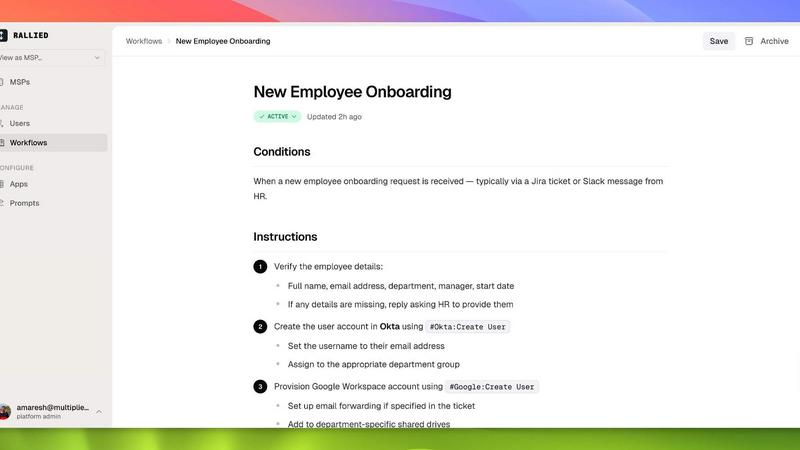
Rallied AI
StreamVox - AI Live Translator

Feature Comparison
Rallied AI
Autonomous Ticket Resolution
Rallied AI autonomously resolves a variety of L1 and L2 tickets, such as password resets and account unlocks. This feature allows it to not only execute fixes but also notify users and update the relevant ticket, reducing the workload on human technicians.
Intelligent Ticket Triage
The AI technician intelligently triages incoming tickets by asking users pertinent questions, categorizing issues by priority, and filling in necessary triage fields. This ensures that tickets are routed to the right technician, minimizing response times and improving service quality.
Efficient Onboarding and Offboarding
Rallied AI simplifies the onboarding and offboarding processes for employees. Whether it is setting up accounts and licenses for new hires or revoking access for departing employees, Rallied can manage these tasks through a single message or ticket, streamlining administrative workflows.
Integration with Existing Tools
Rallied AI connects seamlessly with a wide range of tools, including ConnectWise, Autotask, and Microsoft 365. This integration allows it to operate within the existing tech stack without extensive setup, providing immediate value to MSPs by working with tools they already rely on.
StreamVox - AI Live Translator
Universal Audio Capture & Per-App Isolation
StreamVox offers three distinct audio capture modes to fit any scenario. You can capture your entire system audio, use just your microphone, or, most powerfully, utilize Per-App Capture. This feature allows you to isolate audio from specific applications like Zoom, Chrome, or Discord individually. This means you can translate a meeting in one window without capturing background music or notifications from other apps, ensuring clean, focused subtitles and automatically ignoring irrelevant noise.
Intelligent, Customizable Floating Overlay
The application employs a transparent overlay that stays on top of any other window or full-screen application, from video players to video games. This "invisible" smart overlay is highly customizable, allowing you to adjust font size (from 12px to 72px), text color, background, and crucially, the overlay's opacity. You can make it nearly transparent for a subtle guide or more solid for easy reading, with all preferences saved automatically for a consistent experience.
Extensive Language Support & Bidirectional Translation
Powered by advanced AI, StreamVox supports an impressive array of 49+ input languages and can translate into 49+ target languages. This extensive support ensures coverage for most global languages. Furthermore, it supports bidirectional translation, meaning it can translate both incoming system audio (what you hear) and outgoing microphone audio (what you say), facilitating two-way conversations in real-time during calls or meetings.
Privacy-First Architecture & Low Latency AI
StreamVox is built with a strong commitment to user privacy. All audio processing for translation is done in real-time, and the audio data is never stored on servers or recorded, ensuring your conversations and media consumption remain confidential. This is coupled with an ultra-low latency AI engine that delivers translations quickly enough to keep pace with live dialogue, making interactions feel natural and seamless rather than disjointed.
Use Cases
Rallied AI
Reducing Technician Workload
By allowing Rallied AI to handle routine support tasks, MSPs can free up their skilled technicians to focus on higher-value projects that contribute to business growth. This leads to improved efficiency and morale among the technical team.
Handling Increased Ticket Volume
As MSPs grow, they often face an increase in ticket volume. Rallied AI can manage the surge in L1 and L2 tickets without the need for additional hires, making it a cost-effective solution for maintaining quality service during periods of growth.
Streamlining Employee Lifecycle Management
Rallied AI automates the processes involved in onboarding and offboarding employees, ensuring that necessary accounts and permissions are created or revoked promptly. This reduces the risk of security issues and keeps the organization compliant.
Enhancing Service Desk Effectiveness
By triaging and dispatching tickets effectively, Rallied AI enhances the overall effectiveness of the service desk. It ensures that tickets are addressed quickly and accurately, leading to higher customer satisfaction and retention rates.
StreamVox - AI Live Translator
International Business Calls & Virtual Meetings
Professionals can use StreamVox to participate confidently in global meetings on platforms like Zoom, Microsoft Teams, or Google Meet. By capturing the app's audio directly, it provides real-time subtitles of colleagues speaking in different languages, breaking down communication barriers and ensuring no nuance is lost in critical discussions, all while maintaining meeting flow with low-latency translations.
Consuming Foreign Media & Live Streams
Movie enthusiasts, anime fans, and viewers of international content on YouTube, Netflix, or Twitch can watch videos without relying on official or fan-made subtitles. The overlay works on top of any video player, providing instant live translation of dialogue and commentary, unlocking a vast world of content previously inaccessible due to language constraints.
Cross-Language Gaming & Streaming
Gamers playing on international servers or watching foreign streamers can use StreamVox to understand in-game voice chat, strategy calls, and live commentary. The line-by-line display mode is perfect for fast-paced gaming chats, allowing players to react in real-time and fully engage with a global gaming community without language being a hindrance.
Translating Mobile Phone Calls on PC
Through integration with Microsoft's Phone Link feature, StreamVox extends its capability to mobile communications. Users can connect their iPhone or Android phone to their PC and see live subtitles and translations for their phone calls displayed directly on their computer screen, turning any mobile conversation into a translatable, text-aided dialogue.
Overview
About Rallied AI
Rallied AI is an innovative AI technician designed specifically for Managed Service Providers (MSPs), enabling them to efficiently manage and resolve Level 1 (L1) and Level 2 (L2) support tickets autonomously. By seamlessly integrating with your entire technology stack, Rallied AI acts as a reliable coworker that handles routine IT tasks such as password resets, account unlocks, and permissions adjustments. MSP owners and service managers can leverage Rallied AI to alleviate the burden placed on their skilled L2 and L3 engineers, allowing them to focus on more critical projects that drive business growth. With the ability to interact through platforms like Slack and Teams, Rallied AI provides a user-friendly experience while ensuring that ticket resolution is swift and effective. Its main value proposition lies in enhancing operational efficiency, reducing labor costs, and empowering teams to prioritize strategic initiatives over mundane tasks.
About StreamVox - AI Live Translator
StreamVox - AI Live Translator is a revolutionary Windows application designed to dismantle language barriers in real-time. It functions as a powerful, intelligent layer over your entire PC audio ecosystem, providing live subtitles and instant translation for any sound source. Whether it's a multilingual business call on Zoom, an untranslated foreign film on Netflix, a fast-paced in-game voice chat, or a live-streamed conference, StreamVox processes the audio and displays translated text directly on your screen with ultra-low latency. It is built for a global audience: professionals engaging in international collaboration, gamers connecting across regions, students and enthusiasts consuming foreign media, and anyone who needs to understand or be understood without language constraints. Its core value proposition lies in its seamless, privacy-first, and highly customizable integration into the Windows experience, offering a universal translation tool that is both powerful enough for professional use and accessible enough for daily personal enrichment.
Frequently Asked Questions
Rallied AI FAQ
What if it breaks something?
You have control over what actions Rallied can perform autonomously. Initially, you can set limitations for the AI, allowing it to escalate to a human operator for certain tasks. As you gain confidence in its capabilities, you can gradually expand its autonomy.
We've tried AI tools before; how is Rallied different?
Rallied is designed specifically for MSPs and requires minimal setup compared to other AI tools. Unlike others that need a dedicated admin or extensive training, Rallied integrates quickly with your existing stack and starts working within days.
How does Rallied integrate with existing tools?
Rallied AI connects with a wide variety of tools commonly used by MSPs, such as ConnectWise, Autotask, and others. This seamless integration means you can start utilizing its capabilities without extensive modifications to your existing workflows.
What kind of support can I expect during setup?
Rallied AI provides a dedicated forward-deployed engineer during the initial 30-day trial. This engineer will help map your current stack, customize integrations, and fine-tune workflows to ensure the AI technician operates effectively from day one.
StreamVox - AI Live Translator FAQ
Is my audio data stored or recorded by StreamVox?
No. StreamVox operates on a strict privacy-first principle. All audio processed for live translation is handled in real-time by the AI engine and is never stored on disk, uploaded to a permanent server, or recorded. The translation happens instantaneously, and the audio data is discarded immediately after processing, ensuring complete confidentiality.
What are the system requirements for StreamVox?
StreamVox is designed for modern Windows operating systems. It requires a PC running Windows 10 or Windows 11 (64-bit versions). You will need a stable internet connection for the AI translation processing to function, as well as standard audio input/output devices (speakers and a microphone if using bidirectional translation).
Can I use StreamVox for free?
Yes, StreamVox offers a Free Starter plan that provides 20 minutes of translation time per day at no cost forever. This plan includes access to all 49+ supported languages and core features like system and microphone capture, allowing you to fully test and experience the application's capabilities before committing to a paid subscription for more usage time.
How does the Per-App Capture feature work?
The Per-App Capture feature allows you to select specific running applications (e.g., Discord, Chrome, Zoom) from a list. StreamVox will then only capture and translate the audio from those selected apps, ignoring all other system sounds and audio from unselected applications. This is ideal for focusing on a single meeting or media source without interference from notifications, music players, or other background noise.
Alternatives
Rallied AI Alternatives
Rallied AI is an advanced artificial intelligence technician designed specifically for Managed Service Providers (MSPs). By seamlessly integrating with your entire tech stack, Rallied AI autonomously resolves Level 1 and Level 2 tickets, allowing for efficient support operations. Users can interact with Rallied via popular communication platforms like Slack and Teams, or let it handle tickets directly within their Professional Services Automation (PSA) system. Despite its cutting-edge capabilities, users often seek alternatives to Rallied AI for various reasons, including pricing considerations, specific feature requirements, or compatibility with existing platforms. When evaluating alternatives, it's essential to consider factors such as ease of integration, scalability, the breadth of features offered, and overall user support. Understanding these criteria can help ensure that the chosen solution meets both current and future business needs.
StreamVox - AI Live Translator Alternatives
StreamVox - AI Live Translator is a specialized software application that provides real-time AI-powered subtitles and translation for audio on a Windows PC. It operates within the category of communication and accessibility tools, designed to bridge language gaps during live calls, gaming sessions, media playback, and streaming by overlaying translated text directly onto the screen. Users often explore alternatives for various practical reasons. These can include budget constraints, the need for support on different operating systems like macOS or Linux, or specific feature requirements not covered by a single solution. Some may seek different pricing models, a distinct user interface, or integration with other workplace or creative software ecosystems. When evaluating other options, key considerations should include the range of supported languages, the accuracy and speed of translation, the flexibility of audio source capture, and the customization of the subtitle display. It's also wise to assess the software's impact on system performance, its privacy policy regarding audio data, and the overall value proposition of its free and paid tiers.