
DigitalMagicWand vs QuickImg
Side-by-side comparison to help you choose the right tool.

DigitalMagicWand
DigitalMagicWand is your all-in-one AI suite for creating and transforming images, audio, video, and text with professional precision.
Last updated: March 18, 2026

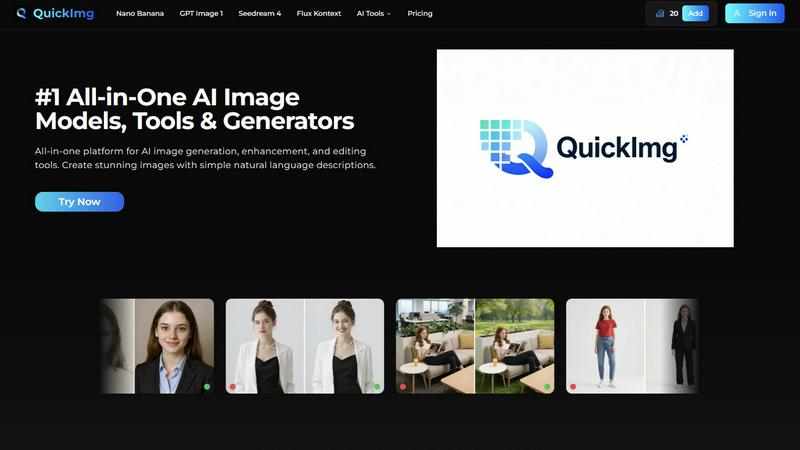
QuickImg is your all-in-one AI platform for generating, enhancing, and editing stunning images effortlessly.
Last updated: February 28, 2026
Visual Comparison
DigitalMagicWand

QuickImg
Feature Comparison
DigitalMagicWand
Comprehensive AI Tool Suite
DigitalMagicWand consolidates a wide array of specialized AI applications into a single, cohesive platform. This includes distinct tools for text analysis and humanization, audio stem separation and MIDI conversion, image generation and editing, and background removal. This integrated approach eliminates the need to juggle multiple subscriptions or software, providing a streamlined workflow for projects that span different media types, all powered by state-of-the-art artificial intelligence.
Advanced Text Processing & Analysis
The platform features sophisticated linguistic algorithms for text. Its AI Detector provides clear, confidence-based scoring to identify machine-generated content from sources like ChatGPT and Gemini. Complementing this, the Undetectable AI Text Humanizer employs proprietary technology to rewrite AI text, eliminating statistical patterns that trigger detectors while preserving the original message's intent and nuance, resulting in natural, human-quality writing.
Professional-Grade Audio Manipulation
For audio professionals and enthusiasts, DigitalMagicWand offers studio-caliber tools. The renowned Digital Ear™ technology provides accurate, expressive MIDI transcription from piano recordings. Furthermore, the UnMixIt™ Pro application allows for the precise isolation of individual song stems like vocals, drums, and bass with remarkable clarity, enabling professional remixing, sampling, and content restoration without the need for complex, traditional studio equipment.
Intuitive AI-Powered Visual Creation
The image tools redefine visual content creation. Users can generate high-quality images or scalable vector (.svg) art from simple text descriptions, with advanced rendering that avoids common AI artifacts. The AI Image Editor acts as a powerful, command-driven photo studio, allowing users to perform complex edits—like object removal, background swaps, or restoration—simply by typing a request, making professional-grade visual manipulation accessible to everyone.
QuickImg
AI-Powered Image Generation
QuickImg utilizes multiple advanced AI models, including Nano Banana Pro and GPT Image 1, to generate images based on simple natural language descriptions. This feature eliminates the need for complex prompts, making image creation accessible to users of all skill levels.
One-Click Editing Tools
The platform boasts a comprehensive suite of one-click editing tools that streamline various tasks, such as background removal, image upscaling, and watermark removal. These tools are designed to save time and enhance user productivity while maintaining high-quality output.
Ready-to-Use Templates
QuickImg provides a wide array of professionally designed templates tailored for common scenarios. Users can quickly access these templates for product photos, social media posts, and more, allowing for instant creativity and efficient project execution.
Multi-Model Flexibility
With QuickImg, users have the flexibility to choose from several AI models optimized for different tasks. This multi-model approach ensures that users can select the best tool for their specific needs, maximizing the quality and relevance of their image outputs.
Use Cases
DigitalMagicWand
Content Creation & Marketing
Marketing teams, social media managers, and bloggers can leverage the platform to produce a high volume of original, engaging content rapidly. They can generate unique blog posts with humanized AI text, create custom illustrations and vector logos for campaigns, produce clean product cutouts for e-commerce, and design promotional visuals—all while ensuring content authenticity passes AI detection checks, maintaining brand integrity and audience trust.
Music Production & Audio Engineering
Musicians, producers, and DJs can transform their workflow using the audio tools. A composer can convert a recorded piano improvisation into a editable MIDI file for further arrangement. A DJ can isolate acapellas and instrumental stems from existing tracks to create unique mashups and remixes. Audio engineers can also use stem separation to restore or remaster older recordings by cleaning up individual mix elements.
Academic & Professional Writing
Students, researchers, and professionals can use the text tools to ensure the integrity and originality of their work. They can screen drafts for unintended AI-generated patterns, humanize text to improve flow and avoid plagiarism detection flags, and generate ideas or drafts that are then refined into authentic, personal writing. This is crucial for maintaining academic honesty and producing professional documents that resonate with a human touch.
Creative Design & Photo Editing
Graphic designers, hobbyists, and photographers can expedite and enhance their creative projects. They can quickly generate concept art or vector graphics from descriptions, remove unwanted objects or people from photos with a simple instruction, seamlessly swap backgrounds, and restore damaged old photographs. This turns time-consuming manual editing tasks into quick, creative explorations, freeing up time for higher-level design thinking.
QuickImg
Marketing Campaigns
Marketing professionals can leverage QuickImg to create visually appealing graphics for campaigns without the need for extensive design skills. By generating images from descriptions, they can focus on strategic aspects while QuickImg handles the visuals.
Social Media Content Creation
Content creators can use QuickImg to produce eye-catching images for their social media platforms. The one-click editing tools and ready-to-use templates allow for rapid content creation, ensuring a consistent and engaging online presence.
E-Commerce Product Photography
Entrepreneurs running e-commerce businesses can enhance their product images using QuickImg’s editing features. By removing backgrounds or adding stylistic elements, they can present their products more attractively to potential customers.
Personal Projects and Hobbies
Hobbyists interested in photography or digital art can utilize QuickImg to explore their creativity. The easy-to-use interface and powerful AI capabilities enable them to transform their ideas into stunning visuals, regardless of their skill level.
Overview
About DigitalMagicWand
DigitalMagicWand is a comprehensive and versatile online platform that serves as a centralized hub for cutting-edge artificial intelligence tools designed to process, enhance, and create digital content. It transcends the limitations of single-purpose applications by offering a unified suite of powerful AI utilities that cater to image, audio, video, and text manipulation. The platform's core value proposition lies in democratizing advanced AI technology, making it accessible to users of all skill levels—from creative professionals and marketers to educators, musicians, and everyday content creators. By integrating a diverse range of specialized applications under one roof, DigitalMagicWand empowers users to tackle complex digital projects with unprecedented ease and efficiency. Whether the goal is to generate stunning visuals from a simple text prompt, transform audio recordings into editable MIDI files, humanize AI-generated text, or perform intricate photo edits with descriptive commands, the platform provides the necessary tools to bring any creative vision to life. It represents a paradigm shift in digital content creation, where the boundary between imagination and execution is seamlessly bridged by intelligent, user-friendly technology.
About QuickImg
QuickImg is a revolutionary platform that reshapes the landscape of digital imagery by consolidating cutting-edge AI-powered visual creation into one user-friendly interface. This all-in-one solution caters to a diverse audience, from beginners who are just stepping into the world of image creation to experienced professionals looking for efficient workflows. With QuickImg, users can effortlessly generate, enhance, and edit images using advanced AI models, including Nano Banana Pro, GPT Image 1, Seedream 4, and Flux Kontext. The platform’s primary value proposition lies in its ability to simplify the image production process, allowing users to create stunning visuals from straightforward natural language descriptions without the complexities of traditional prompt engineering. Additionally, QuickImg offers a robust array of one-click editing tools for tasks such as background removal, upscaling, watermark removal, and style transformation. By democratizing high-quality image production, QuickImg empowers marketers, content creators, designers, entrepreneurs, and hobbyists to produce compelling visual content efficiently and affordably, all while maintaining a seamless user experience.
Frequently Asked Questions
DigitalMagicWand FAQ
What types of files can I process with DigitalMagicWand?
The platform supports a wide range of common file formats across its different tool sets. For image tools, you can typically upload JPG, PNG, and other standard image files, and export results in various formats including SVG for vectors. Audio tools accept popular formats like MP3, WAV, and AIFF. The text tools work directly with pasted text content. Specific format details are available within each application's interface.
How accurate is the AI Text Detector?
The AI Detector is engineered to provide high accuracy by analyzing textual patterns against a vast dataset of both human and AI-generated writing. It delivers results with a clear confidence percentage, giving you a reliable indication of likelihood rather than a simple binary guess. While highly effective, especially for longer texts, it is recommended as a powerful aid for decision-making alongside human judgment for critical applications.
Do I need technical skills to use the AI Image Editor?
No, technical design or photo editing skills are not required. The AI Image Editor is built around a simple, descriptive command interface. You simply type what you want to achieve—for example, "remove the person in the background," "swap the sky to sunset," or "place this vase on a marble table"—and the AI interprets and executes the edit. It's designed to make complex photo manipulation as easy as having a conversation.
Can I use the generated content for commercial purposes?
Yes, content created using DigitalMagicWand's tools, including AI-generated images, humanized text, and processed audio stems, is generally intended for your personal and commercial use. This allows you to incorporate the outputs into client projects, marketing materials, music productions, and other commercial ventures. It is always advisable to review the specific Terms of Service for each tool for the most detailed and up-to-date usage rights.
QuickImg FAQ
How does QuickImg simplify image creation?
QuickImg simplifies image creation by allowing users to generate images from natural language descriptions, eliminating the need for complex prompts and making the process accessible to everyone.
What types of editing tools does QuickImg offer?
QuickImg offers a variety of one-click editing tools, including background removal, image upscaling, watermark removal, and more, all designed to streamline the editing process for users.
Can I use QuickImg for commercial purposes?
Yes, QuickImg is suitable for commercial use, making it an ideal tool for marketers, entrepreneurs, and businesses looking to create high-quality visual content efficiently.
Is QuickImg beginner-friendly?
Absolutely! QuickImg is designed with a user-friendly interface that caters to beginners and professionals alike. Users can easily navigate the platform and utilize its features without prior experience.
Alternatives
DigitalMagicWand Alternatives
DigitalMagicWand is a comprehensive AI assistant platform designed for creators and professionals who work with diverse media. It operates within the broad category of AI-powered creative suites, offering integrated tools for processing and generating images, audio, video, and text through a single online interface. This all-in-one approach simplifies workflows that would otherwise require multiple specialized applications. Users may explore alternatives for various practical reasons. Some seek solutions with different pricing models or subscription tiers that better fit their budget. Others might require a platform with a stronger focus on one specific media type, like advanced video editing or high-fidelity audio generation, beyond a generalized toolkit. Platform compatibility, such as a dedicated desktop application versus a web-based service, or the need for specific collaborative features can also drive the search for other options. When evaluating alternatives, it is crucial to assess your primary creative needs and technical environment. Consider the core media types you work with most frequently and the complexity of tasks you need to accomplish. A balanced evaluation should weigh the depth of specialized tools against the convenience of an integrated ecosystem, while also factoring in the total cost of ownership and the learning curve associated with any new software platform.
QuickImg Alternatives
QuickImg is a cutting-edge platform that belongs to the category of AI-powered image generation and editing tools. It serves as an all-in-one solution for a wide range of users, from novices to professionals, looking to create, enhance, and edit images seamlessly. Despite its robust features, users often seek alternatives due to factors such as pricing, specific feature sets, or compatibility with their existing workflows. Additionally, some may look for platforms that cater more closely to niche needs or personal preferences. When searching for an alternative to QuickImg, it's essential to consider several factors, including the range of features offered, the ease of use, and the pricing structure. Users should also evaluate the platform's ability to integrate with other tools they may be using, the quality of AI models available, and the overall user experience. A solid alternative should provide a balance of functionality and accessibility to ensure that users can achieve professional results without unnecessary complexity.