
poseup vs SparkPix
Side-by-side comparison to help you choose the right tool.

poseup
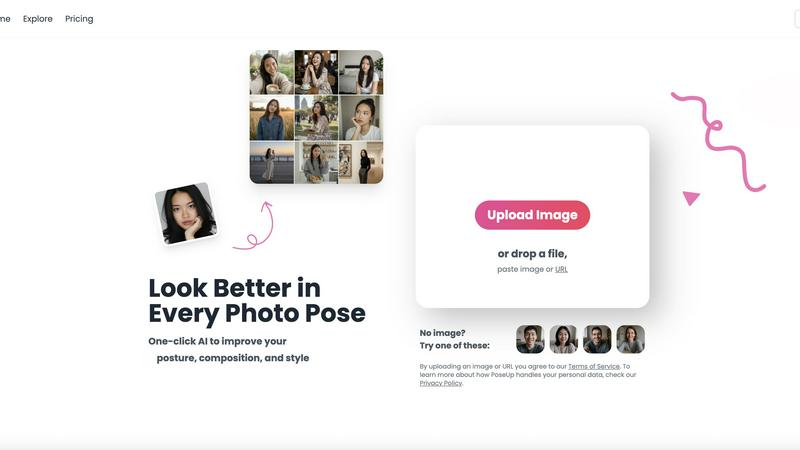
PoseUp enhances your photos with AI, optimizing posture and composition for stunning results in just one click.
Last updated: March 1, 2026

SparkPix
SparkPix is a professional AI photo editor that transforms any image by simply typing your creative vision.
Last updated: March 11, 2026
Visual Comparison
poseup
SparkPix

Feature Comparison
poseup
One-Click Photo Enhancement
PoseUp's one-click enhancement feature empowers users to transform their photos instantly. By analyzing the uploaded images, the tool automatically adjusts posture, composition, and overall visual appeal, making it easy for anyone to achieve professional-level results without any prior photography skills.
Advanced AI Analysis
The core of PoseUp's functionality is its advanced AI analysis. This technology evaluates each photo for posture and composition, suggesting intelligent improvements that enhance the overall aesthetic. Users benefit from automatic corrections, which help produce images that stand out on social media and in personal collections.
Support for Multiple Formats
PoseUp supports a variety of image formats, including JPG, PNG, WEBP, and HEIC, catering to diverse user needs. With a file size limit of 5MB per image, users can upload high-quality photos without worrying about compatibility issues, ensuring a seamless experience for everyone.
Free AI Pose Enhancer
One of the standout features of PoseUp is its free AI pose enhancer, which allows users to experiment with different poses and styles. This feature encourages creativity and exploration, making it perfect for those who want to refine their photography skills or simply have fun with their images.
SparkPix
AI Photo Editor (Edit by Text)
This flagship feature is the cornerstone of SparkPix's innovation. Users upload a reference image and then type specific, natural language instructions into a text box to describe exactly what changes they want to see. The AI engine comprehensively analyzes both the image and the text prompt, applying complex edits like object addition, background replacement, color grading, or detail manipulation in under 30 seconds. This transforms photo editing from a manual, skill-based task into a conversational and intuitive creative process, opening up advanced editing to everyone.
Background Remover
SparkPix offers a highly efficient, one-click background removal tool powered by AI. It is engineered to handle a wide variety of subjects with precision, from clean-cut portraits and e-commerce product shots to complex scenes with fine details like hair or fur. The tool instantly creates a transparent background or allows for immediate replacement, providing a quick and professional solution for creating thumbnails, marketing materials, or social media content without the need for manual selection tools.
Photo Restoration & Enhancer
This dual-capability feature addresses both historical preservation and modern quality improvement. The restoration AI specializes in repairing old, damaged photographs by intelligently fixing scratches, tears, fading, and stains, effectively bringing cherished family archive photos back to life. Concurrently, the enhancer function improves contemporary images by sharpening details, intelligently enhancing colors, reducing digital noise, and upscaling resolution to HD and beyond, all in a single, automated step.
AI Image Generator & Style Transfer
SparkPix extends beyond editing into creation and artistic reinterpretation. The AI Image Generator allows users to create entirely new visuals from text prompts at high resolutions (1K, 2K, 4K). Complementing this, the Style Transfer feature can transform any uploaded photo into a wide range of artistic styles, including anime, oil painting, watercolor, and pencil sketch. This empowers users to explore creative visions, generate unique content for projects, or reimagine their photos in diverse artistic contexts.
Use Cases
poseup
Enhancing Selfies
PoseUp is ideal for individuals looking to improve their selfies. With its one-click enhancements, users can correct their posture and achieve flattering angles that make their selfies look polished and professional, perfect for sharing on social media.
Family Portraits
Families can benefit from PoseUp when capturing special moments together. The tool helps adjust poses and compositions to ensure that everyone looks their best, creating cherished memories that are beautifully presented.
Professional Headshots
For professionals in need of a standout headshot, PoseUp can significantly improve the quality of their images. By optimizing posture and composition, users can create impressive portraits that convey confidence and professionalism, essential for networking and career advancement.
Creative Photography Projects
Amateur photographers working on creative projects can utilize PoseUp to enhance their images. The free AI pose enhancer allows them to experiment with various poses and styles, fostering creativity and enabling them to produce visually striking results.
SparkPix
E-commerce & Product Photography
Online sellers and small business owners can use SparkPix to generate professional product photos without expensive photoshoots. They can remove backgrounds for clean white-backdrop listings, create realistic product mockups by describing scenes (e.g., "this bottle on a rustic wooden table"), and enhance image quality to make products look more appealing on platforms like Shopify or Amazon, directly boosting sales potential.
Personal Photo Restoration & Archiving
Individuals and families can digitally preserve their heritage by using SparkPix to restore damaged, black-and-white, or faded historical photographs. By simply uploading a scanned old photo and prompting the AI to restore and colorize it, users can repair scratches, improve clarity, and add vibrant color, effectively safeguarding and revitalizing precious memories for future generations.
Social Media & Content Creation
Bloggers, influencers, and social media managers can rapidly produce eye-catching content. They can remove unwanted objects or photobombers from images, apply trendy artistic filters via style transfer, create perfect profile pictures or headshots with the passport photo maker, and design custom thumbnails by changing backgrounds—all tailored for platforms like Instagram, YouTube, and TikTok.
Creative Projects & Design Exploration
Artists, designers, and hobbyists can leverage SparkPix as a brainstorming and prototyping tool. The AI Image Generator can bring abstract ideas to life from text descriptions, while Style Transfer allows for experimenting with different artistic interpretations of a base image. This facilitates exploring concepts, creating unique digital art, and generating visual assets for various creative endeavors quickly and intuitively.
Overview
About poseup
PoseUp is an innovative AI-powered photo enhancement tool tailored to elevate the quality of photographs effortlessly. With a simple click, it enhances photo poses, corrects posture, and optimizes composition, making it an essential asset for a broad audience, including social media influencers, amateur photographers, and anyone eager to improve their photo quality without the need for professional training. The main value proposition of PoseUp lies in its ability to transform ordinary images into visually stunning photographs, correcting unflattering poses and optimizing compositions. Whether users are capturing selfies, family portraits, or professional headshots, PoseUp ensures they appear their best in every shot. By harnessing advanced AI technology, it intelligently analyzes images for posture and composition, providing enhancements that can elevate even the simplest photos to a professional standard. Additionally, PoseUp offers a free AI pose enhancer, allowing users to explore and experiment with their photography style, making high-quality visual content accessible to all.
About SparkPix
SparkPix is a revolutionary, web-based AI photo editing platform that democratizes professional-grade image manipulation by replacing complex software interfaces with simple text commands. It is designed for a universal audience, from complete beginners and social media enthusiasts to entrepreneurs, marketers, and creative professionals who seek powerful editing results without the steep learning curve of traditional tools like Photoshop. The core value proposition of SparkPix lies in its intuitive "edit by typing" paradigm; users merely describe the changes they envision—such as "remove the background and place me on a beach at sunset" or "restore this faded family portrait"—and the advanced artificial intelligence interprets and executes these instructions within seconds. This approach eliminates technical barriers, making sophisticated photo restoration, object removal, artistic style transfer, and quality enhancement accessible to anyone with an internet connection. By offering a robust free tier to start and operating seamlessly across desktops, iPhones, and Android devices without any downloads, SparkPix positions itself as a versatile, on-the-go creative companion for transforming personal memories, elevating professional content, and unlocking artistic expression with unprecedented ease and speed.
Frequently Asked Questions
poseup FAQ
How does PoseUp improve my photos?
PoseUp uses advanced AI technology to analyze your photos for posture, composition, and lighting. It then automatically suggests and applies enhancements to help you achieve a more professional look in your images.
Is PoseUp easy to use?
Yes, PoseUp is designed for users of all skill levels. Its one-click enhancement feature allows anyone to improve their photos without needing extensive knowledge of photography techniques, making it accessible for everyone.
What image formats does PoseUp support?
PoseUp supports several image formats, including JPG, PNG, WEBP, and HEIC. This ensures that users can upload their preferred images without compatibility issues, simplifying the enhancement process.
Can I try PoseUp for free?
Yes, PoseUp offers a free AI pose enhancer that allows users to experiment with their photography styles. This feature encourages creativity and lets users explore various poses without any cost before committing to the full service.
SparkPix FAQ
Is SparkPix really free to use?
Yes, SparkPix offers a free tier that requires no credit card to start. New users receive 5 free credits upon signing up, which can be used to test the platform's core features. Additionally, free users may receive 1 credit daily, allowing for ongoing experimentation with basic edits without any financial commitment.
What are credits and how many do I need per edit?
Credits are the unit of consumption for using SparkPix's AI features. The cost per generation or edit varies, but a standard operation like generating an edit based on a text prompt typically costs 5 credits. More complex or high-resolution tasks may vary. The pricing page details how many credits are included in each paid plan.
Do I need to download any software to use SparkPix?
No, SparkPix is entirely web-based and requires no software downloads or installations. It is a cloud-based application that runs directly in your web browser on any device, including desktop computers, iPhones, and Android smartphones. You only need an internet connection to access and use all of its features.
Can SparkPix handle batch editing or multiple photos at once?
Based on the provided information, SparkPix appears to be optimized for single-image processing through its interactive "upload and describe" interface. For editing multiple photos, users would typically process each image individually through the platform. It is designed for precision edits per image based on unique textual instructions rather than applying the same filter to a batch.
Alternatives
poseup Alternatives
PoseUp is an AI-powered photo enhancement tool designed to optimize posture, composition, and overall style in images with a simple click. As a part of the image and photo category, it caters to a range of users, from social media influencers to amateur photographers, aiming to elevate their photography without the need for extensive professional training. Users often seek alternatives to PoseUp for various reasons, including pricing, specific feature sets, or compatibility with different platforms. When choosing an alternative, it's essential to consider factors like usability, the quality of enhancements, supported file formats, and community engagement features that can enrich the user experience. A well-rounded alternative should provide similar functionality and ease of use while catering to individual user needs.
SparkPix Alternatives
SparkPix is a web-based AI photo editor that allows users to transform images through simple text commands. It belongs to the rapidly growing category of AI-powered creative tools, which automate complex editing tasks like background removal, photo restoration, and artistic style transfer. This accessibility makes advanced photo manipulation available to everyone, regardless of technical skill. Users often explore alternatives to find a solution that best fits their unique workflow and requirements. Common reasons include seeking different pricing structures or subscription models, needing specific advanced features not available in one tool, or preferring a downloadable desktop application over a web-based platform. Some may also prioritize integration with other software or have particular needs for batch processing or higher resolution outputs. When evaluating alternatives, consider the core functionalities you use most. Key factors include the accuracy and speed of AI features like object removal and enhancement, the quality and variety of artistic filters, and the platform's ease of use. Also, assess the value of pricing plans against your monthly editing volume and check for any platform limitations to ensure compatibility with your devices.