
Mod vs Skene
Side-by-side comparison to help you choose the right tool.

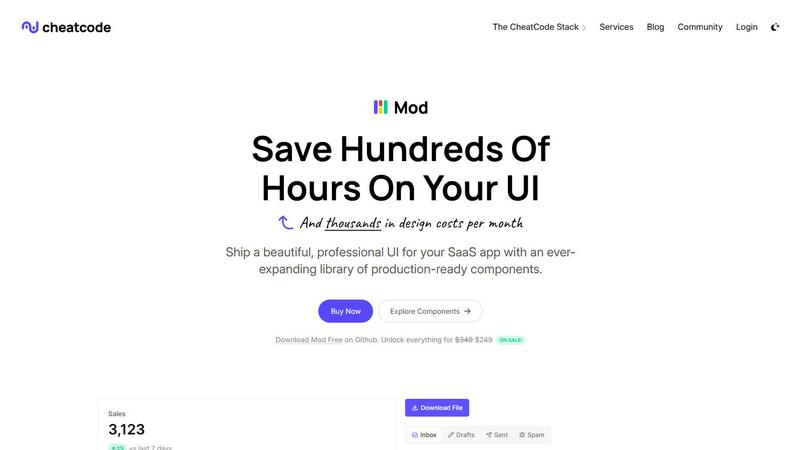
Mod is a CSS framework that accelerates SaaS development with a comprehensive library of ready to use UI components.

Skene automates onboarding and retention directly from your codebase, enabling seamless product-led growth without.
Last updated: February 28, 2026
Visual Comparison
Mod
Skene

Feature Comparison
Mod
Extensive Component Library
Mod provides an expansive suite of over 88 meticulously crafted, reusable UI components. This library covers the entire spectrum of interface needs for a SaaS product, including complex data tables, interactive forms, navigation bars, modals, cards, buttons, and feedback elements like alerts and toasts. Each component is built with accessibility and semantic HTML in mind, ensuring a solid foundation. This depth means developers rarely need to build common elements from scratch, instead assembling interfaces from reliable, pre-tested building blocks. The components are designed to work in harmony, guaranteeing visual consistency across your entire application without any extra effort.
Comprehensive Design System & Theming
Beyond individual components, Mod delivers a complete, coherent design system. This includes 168 distinct style utilities and two fully realized themes (light and dark) that can be applied globally. The system encompasses typography scales, a cohesive color palette with semantic meaning, consistent spacing units, and shadow elevations. The built-in, easy-to-implement dark mode support is a significant advantage for modern applications. This systematic approach ensures that every element you place adheres to the same visual rules, creating a professional and polished look that users instinctively trust, all without requiring a dedicated designer.
Framework Agnostic & Easy Integration
A standout feature of Mod is its complete independence from any specific JavaScript framework or meta-framework. It is crafted as pure, modern CSS with intuitive class names, allowing it to seamlessly integrate with Next.js, Nuxt, SvelteKit, Vite, Ruby on Rails, Django, PHP applications, and virtually any other web technology. This future-proofs your investment, as you can adopt Mod today and carry it forward through any stack migration. Integration is typically as simple as linking a CSS file or installing a package, meaning you can inject a complete design language into a new or existing project in minutes, not days.
Mobile-First & Fully Responsive
Every component and layout utility in Mod is constructed with a mobile-first, responsive philosophy at its core. The styles ensure that interfaces look and function flawlessly on devices of all sizes, from compact smartphones to large desktop monitors. Responsive behavior is baked in through intelligent use of CSS Grid, Flexbox, and responsive utility classes. This eliminates the need to write complex, custom media queries for common adjustments, allowing developers to build for all platforms simultaneously and ensuring a superior user experience regardless of how customers access your SaaS application.
Skene
Automated User Journey Optimization
Skene streamlines the user journey by automatically analyzing user behaviors and interactions. This feature allows for continuous optimization of onboarding, activation, and retention stages, ensuring that the user experience is always improving without manual intervention.
Codebase Integration
Skene connects directly to your codebase, analyzing it to derive valuable growth signals. This direct integration eliminates the need for third-party scripts that can disrupt product performance and keeps your data accessible and manageable within your system.
Real-Time Analytics Dashboard
The platform provides a robust analytics dashboard that tracks real-time user progress, completion rates, and engagement metrics. This feature helps identify bottlenecks in the user journey, enabling developers to make informed adjustments to enhance user experiences.
Outcome-Based Pricing Model
Skene employs an innovative pricing strategy where costs are incurred only when customers successfully complete their onboarding journey. This model aligns Skene's success with that of its users, providing a risk-free way to enhance growth without upfront costs.
Use Cases
Mod
Rapid Prototyping and MVP Development
For entrepreneurs and startups, speed to market is critical. Mod is the perfect tool for rapidly prototyping ideas and building a Minimum Viable Product (MVP). With its vast component library, developers can assemble a fully functional, visually credible front-end in a fraction of the time it would take to design and code from zero. This allows founders to validate business hypotheses with real users quickly, gather feedback, and iterate without being bottlenecked by UI development, enabling a lean and efficient startup methodology.
Modernizing Legacy Application UIs
Many established businesses struggle with outdated, inconsistent user interfaces that harm user satisfaction and productivity. Mod provides a strategic path for incremental UI modernization. Teams can integrate Mod's CSS into specific sections or new features of a legacy application—be it Rails, Django, or a traditional server-rendered app—without a full, risky rewrite. This allows for a gradual, low-risk refresh that delivers immediate visual and UX improvements, boosting internal morale and customer perception while planning for larger architectural changes.
Standardizing Design Across Development Teams
In growing engineering organizations, inconsistent UI implementation across different teams and features is a common pain point. Adopting Mod as a company-wide design system standardizes the visual language and component implementation. It serves as a single source of truth for front-end styles, reducing design debt, eliminating repetitive discussions about pixels and colors, and ensuring a unified brand experience. This leads to more efficient collaboration, faster onboarding for new developers, and a consistently professional product.
Building Internal Tools and Admin Panels
The development of internal dashboards, admin panels, and operational tools often receives less design resources but still requires clarity, functionality, and efficiency. Mod is ideally suited for this use case. Developers can leverage the pre-built data tables, form controls, charts containers, and layout components to construct powerful internal interfaces quickly. The result is a tool that is not only highly functional but also pleasant and intuitive for employees to use, improving operational efficiency and reducing training time.
Skene
Optimizing Onboarding Flows
Indie developers can utilize Skene to refine their onboarding processes. By leveraging automated insights and adjustments, they can ensure new users quickly understand and derive value from their product, reducing drop-off rates significantly.
Enhancing User Retention
Startups can implement Skene to focus on user retention strategies. By continuously monitoring engagement metrics and user behavior, Skene helps identify areas for improvement, ensuring users remain engaged and satisfied over time.
Streamlining Growth Strategies
Product managers can use Skene to develop and implement growth strategies seamlessly. With its automated feature set, managers can focus on high-level strategy while Skene handles the intricate details of user journey optimization.
Facilitating Data-Driven Decisions
With Skene's comprehensive analytics, teams can make data-driven decisions that enhance user experiences. By understanding user behavior and engagement patterns, businesses can tailor their product offerings more effectively to meet user needs.
Overview
About Mod
In the modern landscape of software as a service (SaaS), the user interface is not merely a layer of presentation; it is the primary conduit for user experience, engagement, and value perception. Mod emerges as a definitive solution to the perennial challenge of crafting beautiful, functional, and consistent UIs without the prohibitive costs of custom design or the fragility of piecing together disparate libraries. It is a comprehensive CSS framework meticulously engineered for building SaaS applications. Designed for developers of all stripes—from solo founders and indie hackers to product teams within established enterprises—Mod provides a robust, production-ready design system out of the box. Its core value proposition is profound acceleration. By offering a vast, cohesive collection of pre-styled components and utilities, Mod eliminates countless hours of design decision-making, CSS debugging, and cross-browser compatibility testing. This allows developers to focus their intellectual energy on core application logic, unique features, and business innovation, dramatically shortening the path from concept to a polished, professional product. Its framework-agnostic philosophy ensures this velocity is not sacrificed regardless of your chosen technology stack, making it a versatile and enduring tool in any developer's arsenal.
About Skene
Skene is a groundbreaking automated Product-Led Growth (PLG) iteration engine tailored specifically for indie developers and early-stage startups. Its primary mission is to enable products to achieve sustainable growth autonomously, eliminating the necessity for dedicated growth teams. Skene continuously refines pivotal user journey stages, including onboarding, activation, and retention, by harnessing insights from user behaviors and interactions within the codebase. The platform intelligently monitors user actions to pinpoint friction zones and identify where activation may falter. By automatically creating, testing, and deploying enhanced user flows, Skene ensures that your onboarding process evolves to become more effective over time. This self-learning growth engine liberates developers from the burden of cumbersome dashboards and manual growth meetings, allowing indie creators to concentrate on their core development tasks. Moreover, startups can leverage a comprehensive growth solution conveniently packaged as a “growth team in a box.” With Skene, Product-Led Growth companies can refine their activation strategies and extend customer lifetime value without incurring the costs of additional personnel.
Frequently Asked Questions
Mod FAQ
What makes Mod different from other CSS frameworks like Tailwind or Bootstrap?
While frameworks like Tailwind provide low-level utility classes and Bootstrap offers a component library, Mod is specifically architected for the SaaS domain. It combines the best of both: a comprehensive, high-quality component library (like Bootstrap) that is built upon a consistent, customizable design system with utility classes (conceptually like Tailwind). The key differentiators are its SaaS-focused component selection, its built-in light/dark theme system, its extensive icon suite, and its framework-agnostic purity, offering a more opinionated and complete starting point for business applications.
Is Mod suitable for completely custom designs, or will my app look generic?
Mod is designed as a foundation for custom design, not a constraint. The included themes are professional and polished starting points. However, the entire system is built with customization in mind. Through CSS custom properties (variables) and a well-organized structure, you can easily modify colors, typography, spacing, and component specifics to create a unique brand identity. It provides the consistency and speed of a framework while leaving the door open for deep customization, preventing a "generic" look.
How does the framework-agnostic approach work in practice?
Mod is distributed as standard CSS. You can include it via a CDN link, import it into your main JavaScript/TypeScript file, or install it as an npm package and import the CSS. Since it uses plain CSS class names (e.g., .btn, .card, .grid), it works with any technology that can render HTML and apply CSS classes. There are no framework-specific dependencies, JavaScript bindings, or proprietary syntax to learn, ensuring compatibility with your current and future tech stack.
What is included in the "yearly updates" mentioned?
The yearly updates refer to a commitment to ongoing development and maintenance of the Mod library. Purchasers can expect regular improvements, which typically include new components, additional style variants, enhancements to existing components for accessibility or browser support, updates to the icon library, and adaptations to follow modern web design trends. This ensures that applications built with Mod remain contemporary and leverage the latest best practices in front-end development without requiring manual overhaul.
Skene FAQ
What is PLG software?
PLG (Product-Led Growth) software is designed to help users discover value in a product autonomously, without relying on sales or customer success teams. It automates the user journey, guiding users towards activation and feature adoption through the product itself.
How is Skene different from traditional customer experience software?
Unlike traditional customer experience tools that require manual setup and maintenance, Skene automatically reads your codebase and generates onboarding flows and analytics. This ensures that every change you make to your code updates the user experience without additional effort.
How long does it take to set up?
The setup process is incredibly quick, taking less than 60 seconds. By simply connecting your read-only GitHub or GitLab repository, Skene analyzes the codebase and generates PLG flows without the need for code alterations or API modifications.
Is my code secure with Skene?
Yes, your code remains secure as Skene only requires read-only access to your repository. All analyses are conducted in a secure, isolated environment, ensuring the integrity and confidentiality of your code.