
Looktara vs PhotoWeather
Side-by-side comparison to help you choose the right tool.
Looktara
Looktara is your personal AI photographer that creates authentic, professional photos tailored to your unique style.
Last updated: February 28, 2026

PhotoWeather
PhotoWeather alerts photographers to optimal conditions like golden hour and fog, ensuring you never miss a perfect.
Last updated: February 28, 2026
Visual Comparison
Looktara
PhotoWeather

Feature Comparison
Looktara
Private & Encrypted Personal AI Model
Looktara's foundational technology is a secure, private AI model trained exclusively on your uploaded photos. Unlike public AI models that generate generic faces, Looktara creates a unique digital representation of you. This model is encrypted for privacy, ensuring your biometric data remains confidential. The training process is swift, taking approximately 10 minutes, after which you have a permanent, reusable asset for generating an unlimited variety of your own likeness in any context, guaranteeing that every output is unmistakably and authentically you.
Studio-Grade Photo Quality with Authentic Expression
The platform is specifically engineered to overcome the "uncanny valley" of AI imagery. Looktara prioritizes capturing natural expressions, authentic skin texture, and realistic body language. It avoids the over-smoothed, plastic-like appearance common in AI filters, delivering results that rival those from a professional photoshoot. This commitment to authenticity ensures your photos project confidence, approachability, and professionalism, making them suitable for even the most formal corporate or branding purposes.
Context-Based Styling for Any Platform
Looktara provides intelligent, context-aware styling to match the specific vibe and requirements of different platforms and situations. With simple prompts, you can generate images styled perfectly for a professional LinkedIn profile, a creative Instagram post, a casual Twitter avatar, or a friendly dating app picture. This feature ensures your personal brand remains consistent yet appropriately adapted, giving you the right visual tone for every audience and purpose without needing multiple photoshoots.
Comprehensive Suite of Free Image Tools
Beyond its core AI photography service, Looktara offers a valuable suite of free, standalone image editing tools. This includes utilities for removing backgrounds, blurring faces, cropping, resizing, compressing, converting formats, adding text behind images, and even creating match-cut videos. This ecosystem positions Looktara as a holistic visual content hub, allowing users to not only create perfect base images but also edit and optimize them for any use case, all within one connected platform.
PhotoWeather
Ready-Made Templates
PhotoWeather offers a variety of ready-made templates designed specifically for photographers. These templates cover essential conditions such as fog and mist, golden and blue hour, aurora visibility, and storm intensity. Users can quickly set up alerts based on these pre-defined criteria, allowing for a seamless experience in capturing the perfect shot.
Powerful Rule Builder
The application features a powerful rule builder that allows photographers to create custom alerts based on over 80 weather parameters. This includes metrics like cloud cover, visibility, wind speed, humidity, and astronomical conditions. Users can combine these parameters using AND/OR/NOT logic to define precise conditions, ensuring they are notified only when the weather is just right.
Smart Notifications
PhotoWeather's smart notification system provides users with daily digests, reminders before opportunities start, and alerts when forecasts change. This ensures that photographers are always in the loop about potential shooting conditions. Additionally, the app can sync with users' calendars, adding auto-updating events for easy planning.
Trusted Forecast Sources
The platform aggregates data from the most reliable weather services, including ECMWF, DWD, NOAA, MET Norway, and Météo-France. This commitment to accuracy means that photographers can trust the forecasts they receive, providing them with the confidence to make informed decisions about when and where to shoot.
Use Cases
Looktara
Professional Networking & LinkedIn Profiles
Professionals across all industries can leverage Looktara to create authoritative, trustworthy, and polished headshots that make a powerful first impression on LinkedIn and other business networks. Instead of using an outdated or casual photo, users can generate a studio-quality portrait that conveys competence and credibility, tailored to their specific industry, from finance to tech to creative fields, ensuring their profile stands out to recruiters and clients.
Personal Branding & Content Creation
Entrepreneurs, coaches, speakers, and social media influencers require a steady stream of high-quality, on-brand imagery. Looktara enables the creation of a cohesive visual library featuring the user in various settings and outfits—from formal speaking engagements to casual "day-in-the-life" content. This supports consistent storytelling across websites, newsletters, and social media channels, building a stronger, more recognizable personal brand without the recurring cost of a photographer.
Marketing & Client-Facing Materials
Businesses and freelancers can use Looktara to generate authentic photos of themselves or team members for websites, client proposals, case studies, and "About Us" pages. The ability to produce warm, approachable, or authoritative shots on demand ensures marketing materials feel personal and genuine, fostering better client relationships and trust. It eliminates the need for awkward stock photos that don't truly represent the team.
Dating & Social App Profiles
For dating apps like Tinder or social platforms, presenting an authentic and appealing version of oneself is crucial. Looktara allows users to create a variety of natural, flattering, and context-appropriate photos—from friendly close-ups to full-body shots in interesting settings. This helps build a more engaging and trustworthy profile, moving beyond the limitations of selfies or poorly lit photos to better attract meaningful connections.
PhotoWeather
Landscape Photography
Photographers focusing on landscapes can benefit immensely from PhotoWeather's fog and cloud templates. By receiving alerts for specific weather conditions, they can plan their outings to capture breathtaking vistas under ideal circumstances, such as during the golden hour or when fog envelops the scenery.
Astrophotography
For astrophotographers, knowing when celestial events will occur is crucial. PhotoWeather alerts users about astronomical conditions, such as moon phases and visibility of the Milky Way, ensuring they are prepared to capture stunning night sky images without guesswork.
Wildlife Photography
Wildlife photographers can set alerts for optimal conditions, like low wind speeds or specific weather patterns that encourage animal activity. By using PhotoWeather, they can increase their chances of capturing rare moments in nature, tailored to their preferred shooting locations.
Event Photography
Event photographers can utilize PhotoWeather to plan outdoor shoots by setting weather conditions that suit their needs, such as avoiding rain or ensuring optimal lighting. With real-time alerts, they can adapt their plans to ensure success, regardless of weather fluctuations.
Overview
About Looktara
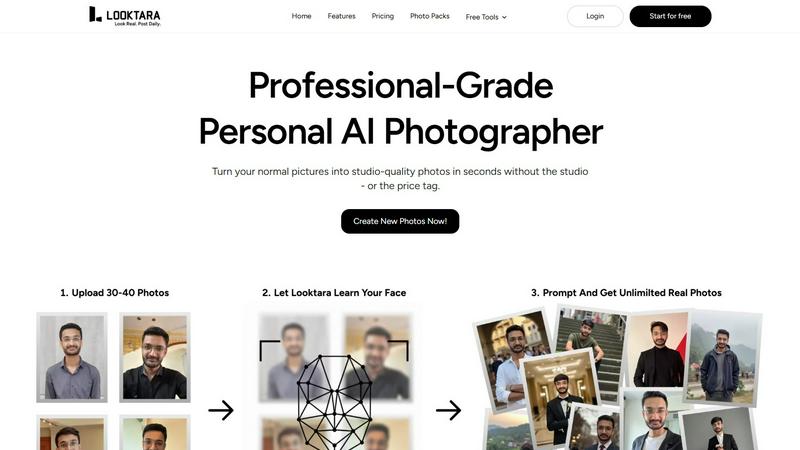
Looktara represents a paradigm shift in personal and professional imaging, positioning itself not merely as another AI photo generator but as your dedicated, on-demand personal AI photographer. At its core, Looktara is engineered to solve a critical modern dilemma: the need for high-quality, authentic, and versatile personal photos that genuinely reflect one's unique persona and brand, without the logistical and financial hurdles of traditional photoshoots. The process is elegantly simple yet powerfully effective. Users begin by uploading a small set of approximately 30 personal photos. Looktara then uses this data to train a private, fully encrypted AI model that learns and encapsulates your distinct facial features, expressions, and essence. Remarkably, this personalized model is ready in about 10 minutes, unlocking the ability to generate studio-grade, customized solo photos tailored to any scenario. Whether you need a commanding headshot for LinkedIn, a warm and engaging portrait for a company website, or a casual behind-the-scenes shot for social media, Looktara delivers with an emphasis on natural authenticity, avoiding the plastic, generic look that plagues many AI alternatives. It is the ideal solution for professionals, entrepreneurs, creators, and anyone seeking to maintain a consistent and compelling visual identity across all platforms with ease and confidence.
About PhotoWeather
PhotoWeather is a cutting-edge weather alert tool specifically designed for outdoor photographers who seek to capture the perfect shot without the hassle of constantly checking multiple weather apps. This innovative platform meticulously monitors weather forecasts around the clock and sends notifications only when the conditions align with your unique photography goals. Whether you are aiming to capture the ethereal beauty of sunrise fog, the awe-inspiring drama of storms, or the fleeting moments of golden-hour light, PhotoWeather ensures you never miss an opportunity. Tailored for landscape, astrophotography, and wildlife shooting, this tool empowers users to set precise weather conditions, receive alerts, and plan their shooting sessions effectively. With ready-made templates and a powerful rule builder, photographers can focus on their art and creativity, confident that they will be alerted to the best conditions for their next masterpiece.
Frequently Asked Questions
Looktara FAQ
How does Looktara ensure my photos and data are private?
Looktara takes privacy and security with the utmost seriousness. The AI model trained on your photos is private and encrypted, meaning it is unique to you and not used for or accessible by any other user. Your uploaded images and the generated model are stored securely. Looktara's policy emphasizes that your data is not shared or used to train general public AI models, ensuring your personal biometric information remains confidential and under your control.
What kind of photos should I upload for the best results?
For optimal model training, upload around 30 clear, high-quality photos of yourself with a variety of angles, expressions, and lighting conditions. Include close-up shots, medium shots, photos with different facial expressions (smiling, neutral), and varied hairstyles or outfits if possible. Ensure your face is clearly visible and well-lit in each photo. This diversity helps the AI learn a comprehensive and accurate representation of you, leading to more versatile and natural-looking generated images.
Can I control the style and background of the generated photos?
Yes, Looktara provides significant control over the final output. During the generation process, you can use text prompts or select style options to guide the AI. You can specify the desired vibe (e.g., "professional," "casual," "authoritative"), setting (e.g., "studio backdrop," "coffee shop," "office"), and even clothing suggestions. This context-based styling is a core feature, allowing you to tailor each photo for its specific platform or purpose.
How is Looktara different from other AI avatar generators?
Looktara distinguishes itself through its focus on authenticity, privacy, and professional-grade utility. While many AI generators produce generic, cartoonish, or overly filtered avatars, Looktara's technology is fine-tuned for hyper-realistic, natural human expression. Furthermore, it builds a private model just for you, rather than applying a one-size-fits-all filter. It also offers platform-specific styling and a suite of professional editing tools, making it a comprehensive solution for serious personal and professional branding needs, not just novelty avatars.
PhotoWeather FAQ
How do I get started?
To get started with PhotoWeather, simply sign up for a free account on the website or download the mobile app from the App Store or Google Play. You can then add your favorite shooting locations and set your desired weather conditions.
How accurate are the forecasts?
PhotoWeather sources its forecasts from reputable meteorological services like NOAA and ECMWF, providing users with reliable and accurate weather predictions tailored for photography needs.
Can I create my own rules?
Yes, PhotoWeather allows users to create custom rules based on over 80 different weather parameters. This flexibility ensures that you can tailor alerts to match your specific photography goals and conditions.
Do you support calendar sync?
Absolutely! PhotoWeather features calendar synchronization that allows you to add photo opportunities directly to your calendar, ensuring you stay organized and prepared for upcoming shooting conditions.
Alternatives
Looktara Alternatives
Looktara is a pioneering application in the generative art category, specifically designed as a personal AI photographer. It specializes in creating authentic, studio-quality images that capture an individual's unique style and natural expressions, moving beyond generic AI outputs to offer a truly personalized visual tool. Users often explore alternatives for a variety of reasons. These can include budget considerations, a need for different feature sets such as specific artistic styles or multi-person generation, or simply a desire to compare options within this innovative and rapidly evolving market. The search for the right tool is a natural part of finding the perfect fit for one's personal or professional branding needs. When evaluating other services, key considerations should include the quality and authenticity of the generated images, the level of personalization and data privacy offered, the speed and ease of the generation process, and the versatility of outputs for different platforms and contexts. The ideal solution should not only create a likeness but should also understand and replicate your unique personal brand and expression.
PhotoWeather Alternatives
PhotoWeather is a specialized tool designed for photographers, providing alerts for optimal photo conditions such as golden hour, fog, and auroras. By continuously monitoring weather forecasts, it eliminates the need for users to check weather apps constantly, ensuring they never miss a perfect moment for their photography. Users often seek alternatives to PhotoWeather for various reasons, including pricing, specific features, or compatibility with their preferred platforms. When choosing an alternative, it's essential to consider the range of features offered, user interface, reliability of alerts, and customization options to ensure it meets your photography needs.