
Kling 5 vs Klipzy
Side-by-side comparison to help you choose the right tool.

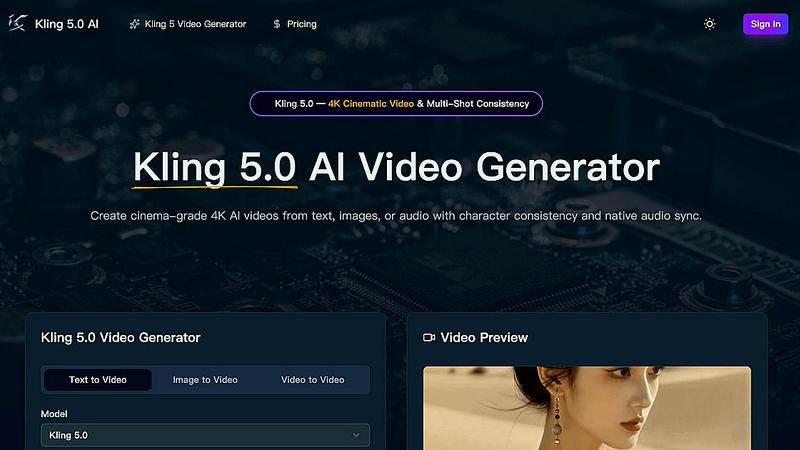
Kling 5.0 generates stunning 4K AI videos from text, images, or audio, ensuring cinematic quality and character consistency across shots.
Last updated: April 13, 2026

Klipzy turns your photos into stunning videos with AI effects, making video creation easy and accessible for everyone.
Last updated: March 1, 2026
Visual Comparison
Kling 5
Klipzy

Feature Comparison
Kling 5
AI-Powered Video Generation
Kling 5.0 harnesses the power of advanced artificial intelligence algorithms to generate high-quality videos directly from text prompts. This feature enables anyone to create professional-grade video content without the need for extensive video editing skills.
Cinematic Quality
With Kling 5.0, users can produce videos that boast a professional, cinematic look and feel. The platform ensures that every generated video meets high visual standards, making it suitable for various applications, from marketing campaigns to artistic endeavors.
Easy to Use
Kling 5.0 features a simple and intuitive interface that demystifies video creation. Users can easily enter their prompts and adjust parameters, making video production accessible to individuals with all levels of technical expertise.
Versatile Styles
The platform offers a diverse range of video styles, allowing users to select from cinematic, animated, and other creative formats. This versatility caters to different project needs, ensuring that every video aligns with the intended message and audience.
Klipzy
AI-Powered Cinematic Effects
Klipzy offers a collection of over 20 AI-powered cinematic effects that allow users to enhance their videos with professional quality. From the classic Ken Burns effect to modern motion blur, these effects are designed to add depth and movement to still images, making videos more engaging and visually appealing.
User-Friendly Interface
The intuitive interface of Klipzy ensures that even those with no prior video editing experience can create stunning videos. Users can simply upload their images, select their desired effect, and download their finished product—all in just three straightforward steps.
Built-In Watermark Remover
Klipzy comes equipped with a built-in watermark remover, allowing users to create polished videos without any distracting logos or markings. This feature is particularly beneficial for creators who wish to maintain a professional appearance in their content without additional editing tools.
Multiple Aspect Ratios and Formats
Klipzy supports various aspect ratios, making it versatile for different social media platforms and content types. Whether you are creating Instagram Reels, TikToks, or YouTube Shorts, users can easily adjust their video settings to ensure optimal viewing on each platform.
Use Cases
Kling 5
Marketing Campaigns
Businesses can leverage Kling 5.0 to create captivating promotional videos that capture attention and communicate their brand message effectively. The ability to produce high-quality content quickly makes it ideal for fast-paced marketing environments.
Social Media Content
Content creators can utilize Kling 5.0 to generate engaging videos tailored for platforms like TikTok, Instagram, and YouTube. The simplicity of generating videos from text prompts enables creators to maintain a consistent posting schedule without sacrificing quality.
Educational Videos
Teachers and educators can use Kling 5.0 to produce informative and visually appealing educational materials. By converting text into engaging video content, complex topics can be made more accessible and entertaining for learners.
Storytelling and Entertainment
Writers and filmmakers can harness Kling 5.0 to visualize their scripts and narratives. By generating cinematic scenes directly from their text, they can explore creative storytelling possibilities and bring their characters to life with ease.
Klipzy
Social Media Content Creation
Klipzy is perfect for social media influencers and marketers looking to create engaging content that stands out. By transforming photos into eye-catching videos, users can enhance their social media presence and connect with their audience on a deeper level.
Real Estate Showcasing
Real estate professionals can use Klipzy to showcase properties in a visually compelling way. By turning still images into dynamic video tours, agents can highlight the unique features of a property, making listings more attractive to potential buyers.
E-commerce Product Promotion
E-commerce businesses can leverage Klipzy to bring their products to life. By creating videos that showcase products in action, sellers can provide potential customers with a more immersive shopping experience, leading to higher engagement and conversions.
Travel Memories and Storytelling
Travel enthusiasts can use Klipzy to turn their travel photos into memorable videos. By adding cinematic effects, users can create captivating travel stories that not only preserve their memories but also inspire others to explore new destinations.
Overview
About Kling 5
Kling 5.0 is an innovative AI video generator that revolutionizes the way videos are created, making it an invaluable tool for content creators, marketers, and anyone looking to produce engaging visual media. With its advanced artificial intelligence, Kling 5.0 allows users to transform simple text prompts into stunning, cinematic-quality videos in mere seconds. Designed with user-friendliness in mind, Kling 5.0 eliminates the barriers typically associated with video production, such as complex editing software and extensive technical knowledge. Whether you're a seasoned filmmaker or a novice, Kling 5.0 empowers you to bring your ideas to life effortlessly. The platform supports various video styles, including cinematic and animated formats, ensuring you can tailor your content to suit any project or audience. With its exceptional 4K resolution output, Kling 5.0 elevates your video projects, making them ideal for commercial use, social media sharing, or personal enjoyment.
About Klipzy
Klipzy is a groundbreaking AI-powered tool crafted for content creators, marketers, and social media enthusiasts eager to enhance their visual storytelling. This innovative application simplifies the process of transforming static images into dynamic video content, making it accessible to users regardless of their video editing skills. With Klipzy, users can effortlessly upload photos and choose from over 20 professional cinematic effects, such as the Ken Burns effect and motion blur, to bring their images to life. This tool not only democratizes access to high-quality video production but also allows users to create engaging content tailored for various platforms including Instagram, TikTok, and YouTube. Ideal for both seasoned professionals and newcomers, Klipzy empowers users to captivate their audience and elevate their online presence with just a few clicks, making video creation an enjoyable and efficient experience.
Frequently Asked Questions
Kling 5 FAQ
How does Kling 5.0 generate videos from text prompts?
Kling 5.0 uses advanced AI algorithms that interpret the text prompts provided by users. It generates corresponding video content with cinematic quality, including character animations and visual effects.
What video styles are supported by Kling 5.0?
Kling 5.0 supports a variety of video styles, including cinematic and animated formats. This versatility allows users to choose the style that best fits their project requirements and audience preferences.
Can I customize the videos generated by Kling 5.0?
Yes, users can customize their videos by adding text, selecting music, and applying various effects. This feature allows for further personalization to match the user’s vision and project needs.
What is the maximum resolution for videos created with Kling 5.0?
Kling 5.0 generates videos in stunning 4K resolution, ensuring high-quality visuals suitable for professional use, broadcast, and online sharing. This level of detail enhances the overall viewing experience for audiences.
Klipzy FAQ
What image formats are supported?
Klipzy supports JPG, PNG, and WebP image formats, allowing users to upload a variety of images for transformation into videos.
How long can the videos be?
Klipzy allows users to create videos with a maximum duration of 15 seconds, making it ideal for quick, engaging content suitable for social media platforms.
What aspect ratios are available?
Klipzy offers multiple aspect ratios to cater to different social media platforms, ensuring that videos are optimized for viewing on Instagram, TikTok, YouTube, and more.
Is this a subscription?
Klipzy operates on a one-time purchase model, offering a $10 license for users to download the app and start creating videos without any recurring fees.
Alternatives
Kling 5 Alternatives
Kling 5 is an innovative AI video generator that belongs to the realm of digital content creation tools. It allows users to effortlessly convert text prompts into high-quality videos, making it an essential asset for marketers, educators, and content creators looking to engage their audiences. However, users often seek alternatives due to a variety of reasons, such as pricing structures, specific feature sets that may better suit their needs, or compatibility with various platforms. When exploring alternatives to Kling 5, it's important to consider several factors to ensure the chosen tool aligns with your goals. Look for platforms that offer similar AI-powered video generation capabilities, a user-friendly interface, and customizable options. Additionally, assess the resolution quality, available video styles, and any support or community resources that can enhance your video creation process.
Klipzy Alternatives
Klipzy is an innovative AI-powered tool that falls into the productivity and management category, specifically designed for content creators, marketers, and social media enthusiasts. By transforming still images into captivating videos with cinematic effects, Klipzy allows users to enhance their visual storytelling effortlessly. However, users often seek alternatives for various reasons, including pricing concerns, specific feature requirements, or compatibility with different platforms. When searching for an alternative, it's essential to consider factors such as the variety of effects offered, ease of use, upload options, and whether the tool supports the aspect ratios needed for your preferred social media channels. A good alternative should empower users to create engaging video content while catering to their specific requirements without compromising quality or accessibility.