
Gaffa vs Playwriter
Side-by-side comparison to help you choose the right tool.

Gaffa streamlines web automation and data extraction with a simple API that controls real browsers effectively and.
Last updated: March 1, 2026

Playwriter
Playwriter enables seamless control of your existing Chrome browser with AI, allowing agents to execute Playwright code without limitations.
Last updated: March 18, 2026
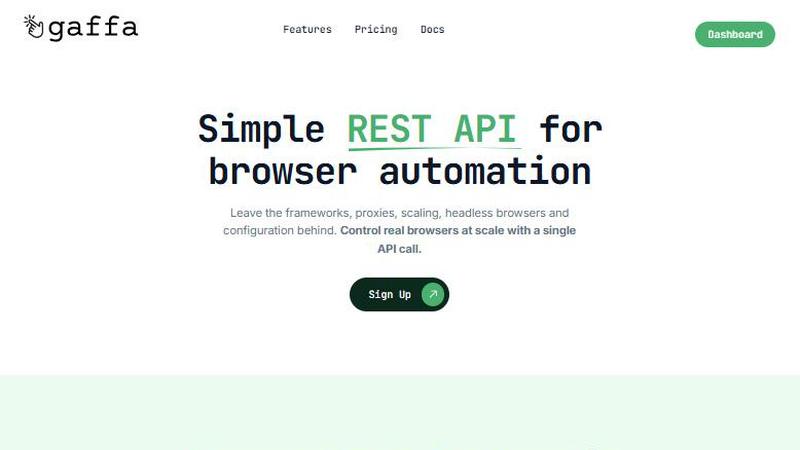
Visual Comparison
Gaffa
Playwriter

Feature Comparison
Gaffa
Simple REST API for Browser Automation
Gaffa’s intuitive REST API allows users to automate real browsers with just a single API call. This removes the need to navigate complex frameworks and configurations, enabling quick and efficient web data extraction.
Automate Real Browsers in Minutes
With Gaffa, users can scrape content, capture screenshots, or convert web pages into LLM-ready markdown formats effortlessly. This feature simplifies the automation process, making complex tasks manageable within minutes.
Ready to Scale
Gaffa is designed to handle projects of any scale. Users can focus on their data objectives without worrying about the complexities of scaling web data operations, as Gaffa manages the underlying infrastructure seamlessly.
Full Observability
Gaffa provides users with the ability to record their automations, offering full visibility into the process. This feature enables users to monitor and troubleshoot their tasks effectively, ensuring smooth operations.
Playwriter
Integration with Existing Browser Sessions
Playwriter connects directly to your current Chrome session, allowing agents to use all your existing logins, cookies, and extensions. This integration prevents common issues like bot detection and ensures a smooth experience without the need for extra memory or a fresh browser instance.
Full Playwright API Access
With Playwriter, agents can access the complete Playwright API through a single execution tool. This feature simplifies the automation process, enabling users to run any Playwright code without the hassle of wrappers or multiple tool definitions, streamlining the automation workflow.
Real-Time Collaboration
Playwriter facilitates real-time collaboration between users and agents. As the agent performs tasks in your browser, you can observe its actions, intervene when necessary, and resolve issues like captchas or consent walls instantaneously, enhancing the overall efficiency of the workflow.
Advanced Debugging Tools
The platform includes a powerful debugger with breakpoints, live code editing, and network interception capabilities. These features allow users to troubleshoot and optimize their automation scripts effectively, providing a comprehensive development environment that caters to both novice and experienced users.
Use Cases
Gaffa
Market Research
Businesses can utilize Gaffa to scrape data from competitor websites, gathering insights on pricing, product offerings, and customer feedback. This information is invaluable for shaping marketing strategies and product development.
Academic Research
Researchers can automate the extraction of data from various online sources, making it easier to compile and analyze information relevant to their studies. Gaffa simplifies the process of gathering large datasets for academic purposes.
E-commerce Monitoring
E-commerce businesses can leverage Gaffa to track inventory levels, pricing changes, and promotional offers on competitor sites. This helps them remain competitive and responsive to market trends.
Content Aggregation
Content creators and marketers can use Gaffa to collect data from multiple sources, allowing them to curate relevant content or perform sentiment analysis on user-generated reviews and comments across various platforms.
Playwriter
Automated Testing and QA
Playwriter is perfect for developers and testers who need to automate web applications. By allowing agents to interact with live sessions, it helps identify bugs and issues in real-time, ensuring a smoother user experience and faster product releases.
Web Scraping
For data scientists and analysts, Playwriter simplifies web scraping tasks. Agents can navigate websites, collect data, and handle authentication, all while using your logged-in session, making the data extraction process more efficient and less prone to errors.
Accessibility Testing
Playwriter's snapshot feature allows teams to take accessibility snapshots while browsing. This functionality enables users to verify that their web applications are compliant with accessibility standards, ensuring a better experience for all users.
User Experience Research
UX researchers can leverage Playwriter to observe user interactions in real-time. By collaborating with agents, they can gather insights on user behaviors and preferences, facilitating informed design decisions and improving overall product usability.
Overview
About Gaffa
Gaffa is a cutting-edge web data extraction and automation tool designed to streamline the often complex task of web scraping. As businesses increasingly rely on data-driven insights, the challenges associated with acquiring reliable web data at scale become more pronounced. Gaffa addresses these challenges head-on, providing a powerful REST API that enables users to automate real browser tasks with ease. By eliminating the need for cumbersome frameworks, unreliable proxies, and intricate infrastructure maintenance, Gaffa allows businesses, developers, and data analysts to focus on their core objectives rather than troubleshooting broken scraping pipelines. Its capability to mimic human browsing behavior ensures seamless data extraction from even the most challenging websites. Gaffa is an ideal solution for anyone looking to harness web data for competitive analysis, business intelligence, or research, making it a comprehensive tool that scales according to user needs.
About Playwriter
Playwriter is an innovative tool designed to empower AI agents with the ability to interact seamlessly with your actual browser session. Unlike traditional AI agents that operate in isolated environments with limited functionality, Playwriter integrates directly with your existing Chrome setup. It allows agents to utilize your logged-in accounts, extensions, and cookies, thus eliminating common obstacles such as bot detection and the need for constant reauthentication. This solution is ideal for developers, testers, and automation enthusiasts who require a reliable method to automate web interactions while maintaining a human-like browsing experience. By providing a powerful Chrome extension and a robust API, Playwriter enhances productivity and collaboration, enabling users to leverage the full capabilities of Playwright without the constraints of conventional automation tools.
Frequently Asked Questions
Gaffa FAQ
What is a credit worth?
Gaffa charges for browser requests based on credits, which are allocated depending on request length and any proxy usage. The cost is 1 credit per 30 seconds of request time, and using a proxy doubles this cost.
Does this app offer a free trial period?
Yes, Gaffa offers a free sign-up option that allows users to explore its key features on a demo site. This enables potential customers to test the automation capabilities before committing to a paid plan.
What's the refund policy?
Gaffa provides a refund option if requested before any credits are utilized in the current month. This policy ensures that users have the flexibility to change their minds without financial penalties.
Do credits rollover?
No, any unused credits in a given month do not carry over to the following month. This encourages users to maximize their use of the platform within the billing cycle.
Playwriter FAQ
How does Playwriter ensure security?
Playwriter operates entirely on your local machine, meaning no data is sent to remote servers. The Chrome extension connects via a WebSocket to a local relay, ensuring that your browsing session remains secure and private.
What platforms does Playwriter support?
Playwriter is compatible with any MCP client, including Cursor, Claude, and VS Code. This versatility allows users to integrate Playwriter into their preferred development environments seamlessly.
Can multiple agents use Playwriter simultaneously?
Yes, Playwriter supports multiplexing sessions. Multiple agents or CLI instances can operate within the same browser session at the same time, facilitating collaborative automation tasks without conflicts.
Is Playwriter open source?
Yes, Playwriter is open source and released under the MIT license. This allows users to contribute to the project, customize the tool according to their needs, and benefit from community-driven enhancements.
Alternatives
Gaffa Alternatives
Gaffa is an advanced web data extraction and automation tool that falls under the category of productivity and management solutions. It is designed to simplify the complexities associated with web scraping by providing a powerful API that enables users to control real browsers seamlessly. With the increasing challenges of obtaining reliable web data at scale, users often seek alternatives to Gaffa for various reasons, including pricing structures, specific features, or the need for compatibility with existing platforms. When considering alternatives to Gaffa, it is essential to evaluate the features that matter most to your specific use case. Look for options that offer a user-friendly interface, robust automation capabilities, and scalability to handle extensive data projects. Additionally, consider the level of support and documentation provided, as well as the flexibility to integrate with other tools you may already be using.
Playwriter Alternatives
Playwriter is an innovative tool that falls within the automation category, designed to empower users with the ability to control Chrome through an AI interface via CLI or MCP. It stands out for its unique approach, allowing AI agents to leverage actual browser sessions, complete with all your logins and extensions, rather than a generic browsing experience. This level of functionality is particularly appealing to those who require seamless integration of automation into their workflows. Users often seek alternatives to Playwriter for various reasons, such as pricing constraints, specific feature requirements, or compatibility with different platforms. When considering an alternative, it is essential to evaluate factors like ease of use, available features, customer support, and whether the solution aligns with your technical needs. An ideal alternative should also provide the necessary tools for effective automation while ensuring a smooth user experience.