
BarBrain vs TinyFast
Side-by-side comparison to help you choose the right tool.

BarBrain
BarBrain revolutionizes inventory management in hospitality, cutting counting time in half while ensuring accurate and reliable results.
Last updated: April 4, 2026

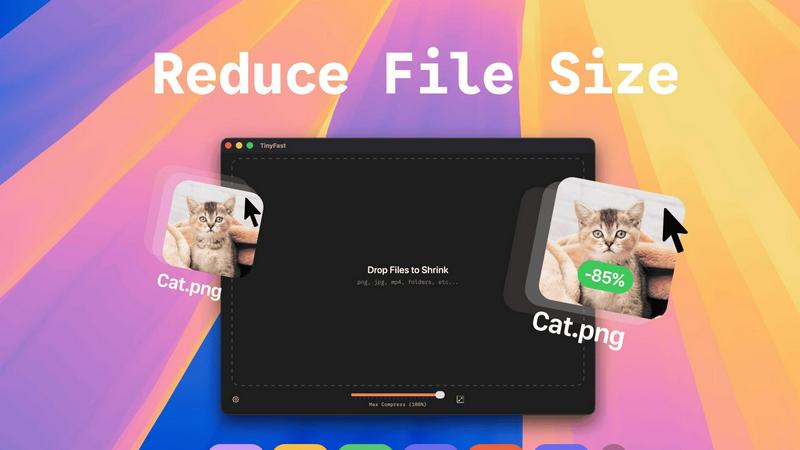
TinyFast is a private Mac app that swiftly compresses images, videos, and documents locally for ultimate privacy and.
Last updated: February 28, 2026
Visual Comparison
BarBrain

TinyFast
Feature Comparison
BarBrain
Parallel Counting on Multiple Devices
BarBrain supports simultaneous inventory counting across various iOS and Android devices, significantly enhancing efficiency. This feature allows teams to work together in real-time, ensuring faster and more accurate inventory management.
Extensive Product Catalog
With a catalog boasting over 30,000 products, BarBrain allows you to track everything from spirits and non-alcoholic beverages to food items and housekeeping supplies. This vast array ensures that every aspect of your inventory is covered, making it ideal for diverse establishments.
Automated Inventory Reporting
Say goodbye to tedious post-inventory processing. BarBrain automatically generates comprehensive inventory reports after each count, saving you time and effort. This feature ensures that you receive well-organized data without the hassle of manual entry.
Food Level Slider for Open Items
BarBrain simplifies the tracking of food and beverage products with an intuitive fill level slider. This feature allows users to easily input both opened and unopened items with just a tap, making inventory management more straightforward and efficient.
TinyFast
Batch & Drag-Drop Shrink
With TinyFast, users can easily compress entire folders in a single action. Simply drop a folder containing multiple files into the app, and within seconds, receive optimized outputs for all included files. This feature significantly enhances productivity by allowing bulk processing without the need for multiple individual uploads.
Blazing-Fast Compression
TinyFast employs optimized native engines that ensure rapid file compression, allowing users to shrink large files in mere seconds. Unlike online tools, which often require waiting for uploads and downloads, TinyFast delivers immediate results, making it an ideal solution for users who value time and efficiency.
Resize Resolution
Users can set TinyFast to automatically resize the resolution of images and videos during compression. This feature enables professionals to maintain the right balance between quality and file size, ensuring that their digital assets are not only optimized but also visually appealing for their intended use.
100% Local & Private
TinyFast prioritizes user privacy by ensuring that all file processing remains on the device. Users can rest easy knowing that their files are never uploaded to cloud servers or third-party websites. This design commitment to privacy empowers users to work with confidential documents without fear of data exposure.
Use Cases
BarBrain
Single Establishment Management
For independent bars and restaurants, BarBrain offers a tailored solution to streamline inventory processes. Users can easily manage their stock, reduce time spent on counts, and ensure accurate reporting, leading to significant cost savings.
Multi-Location Oversight
For those managing multiple establishments, BarBrain provides a unified platform for inventory tracking. It offers a holistic view of inventory across all locations, enabling better control over stock levels and improved financial oversight.
Hotel Inventory Management
BarBrain is also ideal for the hospitality sector, allowing hotels to efficiently track all food and beverage products across various dining venues. This capability ensures that hotels can maintain optimal stock levels and minimize waste.
Cost Analysis and Waste Reduction
BarBrain empowers operators to identify discrepancies in inventory, helping to flag waste and shrinkage in real time. This allows businesses to make informed decisions, optimize their resources, and improve overall profitability.
TinyFast
Optimizing Digital Assets for Web Development
Web developers often deal with large image and video files that can slow down website loading times. TinyFast allows them to compress these assets locally, ensuring that websites remain fast and responsive while maintaining high visual quality.
Streamlining Content Creation
Content creators, including bloggers and social media managers, frequently require optimized images and videos for their posts. With TinyFast, they can quickly compress and resize their media files without needing to rely on internet connectivity, allowing for a more efficient workflow.
Preparing Files for Client Presentation
Designers and professionals who present work to clients need to ensure that their files are not only high-quality but also easily shareable. TinyFast enables them to compress large files while keeping them secure, making it easier to send presentations via email or upload to shared drives.
Managing Confidential Projects
For professionals handling sensitive or proprietary information, TinyFast provides a reliable way to compress files without the risk of data breaches. By keeping everything local, users can confidently manage confidential projects, knowing their data is protected.
Overview
About BarBrain
BarBrain is a revolutionary inventory management software specifically designed for the hospitality industry. It addresses the unique challenges faced by bar and restaurant owners who often struggle with the complexities of inventory tracking. Traditional warehouse software falls short, failing to comprehend the intricacies of pours, recipes, and perishables. BarBrain transforms this process by streamlining inventory management, allowing users to count stock in mere minutes rather than hours. With BarBrain, operators can easily calculate precise costs per drink and dish, monitor waste and shrinkage in real time, and consolidate supplier orders, all within a user-friendly interface. There are no lengthy training manuals or confusing features; BarBrain is intuitive and tailored to the operational flow of bars and restaurants. Whether you manage a single cocktail bar or an expansive multi-location restaurant group, BarBrain equips you with the accurate data needed to safeguard your profit margins and eliminate revenue loss.
About TinyFast
TinyFast is a groundbreaking macOS application designed to empower users by eliminating their reliance on online file compression services, which often expose sensitive data to privacy risks. This powerful, local file shrinker supports a diverse range of formats—including images (PNG, JPEG, WebP, GIF, SVG), videos (MP4, MOV), documents (PDF), and audio files (MP3). By processing files directly on your Mac, TinyFast guarantees a seamless, secure, and incredibly fast workflow. Users can simply drag and drop files into the app and receive optimized versions almost instantly, all while ensuring that no data leaves the secure confines of their local machine. Catering specifically to developers, designers, content creators, and professionals who handle confidential assets, TinyFast addresses critical pain points such as privacy concerns, dependency on internet connectivity, and the slow upload/download times often associated with third-party services. With its focus on local processing, TinyFast ensures total privacy, constant availability, and remarkable compression speeds—making it an indispensable tool for anyone looking to optimize their digital assets efficiently and responsibly.
Frequently Asked Questions
BarBrain FAQ
How does BarBrain improve inventory accuracy?
BarBrain eliminates manual entry errors and guesswork by providing precise data through automated counting and reporting. This ensures that you have reliable inventory numbers at your fingertips.
Is BarBrain easy to implement?
Yes, BarBrain is designed for quick and easy implementation. After scheduling a demo and setting up an account, users can start their first digital inventory in no time, with support available throughout the process.
Can BarBrain be used on multiple devices?
Absolutely! BarBrain allows for simultaneous use on multiple iOS and Android devices, making it perfect for teams that need to collaborate during inventory counts.
What kind of support does BarBrain offer?
BarBrain provides comprehensive support, including assistance with setting up your product catalog and troubleshooting any issues. Their team is dedicated to ensuring that your inventory management process runs smoothly.
TinyFast FAQ
How does TinyFast ensure privacy?
TinyFast processes all files locally on your Mac, meaning no data is uploaded to cloud servers or third-party sites. This design guarantees that your files remain private and secure.
What types of files can I compress with TinyFast?
TinyFast supports a wide variety of file formats, including images (PNG, JPEG, WebP, GIF, SVG), videos (MP4, MOV), documents (PDF, DOCX), and audio files (MP3), making it a versatile tool for all your compression needs.
Is TinyFast easy to use for beginners?
Absolutely! TinyFast features a straightforward drag-and-drop interface that makes it incredibly easy for users of all skill levels to compress their files quickly and efficiently without any technical knowledge.
What are the system requirements for TinyFast?
TinyFast is designed exclusively for macOS, ensuring optimal performance on Apple devices. Users should check the app's official website for the latest system requirements and compatibility information.
Alternatives
BarBrain Alternatives
BarBrain is an innovative inventory management solution specifically designed for the hospitality industry. By addressing the unique challenges faced by bar and restaurant owners, BarBrain streamlines the often tedious process of counting stock, tracking costs, and managing supplier orders. This specialized approach sets it apart from generic warehouse software, making it a vital tool for those seeking to optimize their operations. Users commonly seek alternatives to BarBrain for various reasons, including pricing concerns, specific feature requirements, or the need for compatibility with existing systems. When exploring alternatives, it’s crucial to consider factors such as ease of use, the ability to handle perishables, and real-time data reporting. A solution that aligns with the unique workflows of hospitality operations can significantly enhance inventory accuracy and operational efficiency.
TinyFast Alternatives
TinyFast is an innovative macOS application designed for the efficient local compression of images, videos, documents, and audio files. As a tool that prioritizes user privacy and speed, it appeals to a wide range of professionals, including developers, designers, and content creators who require secure file handling. Users often seek alternatives to TinyFast due to varying needs such as specific feature sets, pricing differences, or compatibility with different operating systems. When selecting an alternative, it's essential to consider factors like processing speed, data security, platform compatibility, and user-friendly interfaces that enhance overall productivity. Choosing an alternative should also involve assessing the level of local processing versus cloud-based solutions, especially for users who prioritize data privacy. The ease of use and the ability to handle multiple file types efficiently can greatly influence the decision-making process. Furthermore, evaluating customer support, update frequency, and community engagement can provide insight into the reliability and longevity of the alternative solution in question.