

SocialCal
SocialCal effortlessly schedules and publishes your content to ten platforms with one click for maximum visibility and.
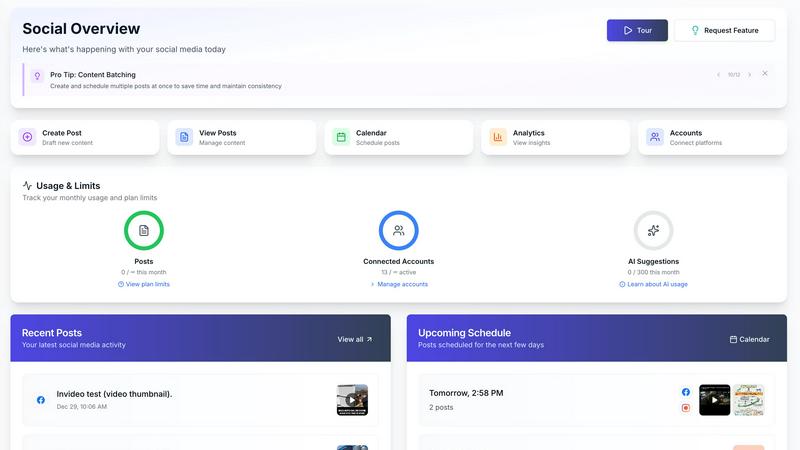
About SocialCal
In today's fast-paced digital landscape, maintaining a robust social media presence is essential for creators, marketers, and businesses alike. However, managing multiple social media accounts can quickly spiral into a chaotic experience, consuming valuable time and resources. Enter SocialCal, the all-in-one social media management platform that simplifies and streamlines your entire social media workflow. From content creation and visual planning to cross-platform scheduling and in-depth performance analytics, SocialCal unifies every critical task into a single, user-friendly dashboard. Designed for modern creators and teams, SocialCal removes the complexity of juggling multiple applications, logins, and browser tabs. Its primary value proposition lies in delivering profound simplicity alongside powerful capabilities, enabling users to save over 15 hours per week. With the ability to schedule posts across ten major platforms—including Instagram, TikTok, X (formerly Twitter), LinkedIn, Facebook, YouTube, Threads, Bluesky, Pinterest, and Telegram—with just one click, SocialCal ensures your message reaches your audience wherever they are. Powered by advanced AI technology, it assists in generating platform-optimized content while its visual tools and unified analytics provide the clarity and control necessary for effective brand growth. Whether you are a solopreneur building a personal brand or a small team managing multiple client accounts, SocialCal is the affordable, comprehensive, and indispensable tool for social media success.
Features of SocialCal
Multi-Platform Publishing
SocialCal allows users to post to ten different platforms simultaneously with just one click. This feature enables creators to save time by eliminating the need to log into multiple apps or copy-paste the same content across various networks. With SocialCal, you can efficiently connect with your audience across Instagram, TikTok, LinkedIn, and more, maximizing your reach with ease.
Smart Scheduling
The Smart Scheduling feature helps users optimize their posting times for maximum engagement. By analyzing audience behavior and trends, SocialCal suggests the best times to post, ensuring that your content gets the visibility it deserves. This intelligent scheduling capability lets you focus on creating high-quality content while the platform takes care of timing.
AI Caption Writer
Crafting engaging captions can be a challenge, but SocialCal's AI Caption Writer takes the guesswork out of the equation. This feature generates captions in various tones, allowing you to tailor your messaging to fit different platforms and target audiences. Whether you need a professional tone for LinkedIn or a casual vibe for Instagram, the AI Caption Writer has you covered.
Analytics Dashboard
The Analytics Dashboard provides a comprehensive view of your social media performance across all connected platforms. Users can track key metrics such as engagement rates, reach, and follower growth, enabling them to make data-driven decisions that enhance their social media strategy. This centralized analytics tool simplifies performance tracking and helps you understand what works best for your audience.
Use Cases of SocialCal
Content Creators
For individual content creators, SocialCal serves as a robust tool to manage their online presence. With the ability to create, schedule, and analyze posts all in one place, creators can focus on their craft while the platform handles the logistics. This efficiency allows them to engage with their audience consistently without feeling overwhelmed.
Marketing Agencies
Marketing agencies managing multiple clients benefit significantly from SocialCal's multi-client management features. Teams can seamlessly schedule and analyze content for various brands from a single dashboard, streamlining their workflow and enhancing productivity. Additionally, the ability to manage different client profiles allows for tailored strategies that resonate with diverse audiences.
Small Businesses
Small business owners can leverage SocialCal to grow their brand without the overhead costs associated with larger social media management tools. By simplifying the scheduling and analytics processes, SocialCal empowers businesses to maintain a strong digital presence, engage with customers, and drive sales—all while saving time and resources.
Nonprofits and Community Organizations
Nonprofits and community organizations can utilize SocialCal to effectively promote their causes and events across multiple social media platforms. The tool enables them to reach a wider audience, increase engagement, and raise awareness without the need for extensive marketing budgets. With features like Smart Scheduling and the Analytics Dashboard, these organizations can maximize their impact.
Frequently Asked Questions
How does SocialCal improve my social media management?
SocialCal streamlines social media management by centralizing tasks such as content creation, scheduling, and analytics into one intuitive platform. This integration reduces the time spent managing multiple accounts, allowing users to focus more on content quality and audience engagement.
Can I manage multiple clients with SocialCal?
Yes, SocialCal is designed with agencies and teams in mind, allowing users to manage multiple client profiles from a single dashboard. This feature enables efficient scheduling and performance tracking for different brands without the need for multiple logins.
What social media platforms does SocialCal support?
SocialCal supports a wide range of platforms including Instagram, TikTok, X (formerly Twitter), LinkedIn, Facebook, YouTube, Threads, Bluesky, Pinterest, and Telegram. This extensive compatibility allows users to effectively reach audiences across various networks.
Is SocialCal suitable for beginners?
Absolutely! SocialCal features a user-friendly interface that prioritizes simplicity and ease of use. With a quick setup process and no overwhelming menus, beginners can start scheduling their content almost immediately after signing up.
Similar to SocialCal

sorry text repeater
Free tool to copy-paste "sorry" text repeatedly. Pick a count, layout, and emojis — no sign-up needed.


UseWok
Done-for-You SaaS Visibility for Search & AI | UseWok

Postqued
Schedule and publish social content across 10 platforms with one dashboard, API, and MCP built for teams and AI agents.

CloutStack
A curated list of tools for influencers in the creator economy

Vaydur AI
Vaydur AI discovers trending content in any niche and instantly generates ready to film scripts and briefs while tracking performance across.

BuzzHike
BuzzHike uses AI to help creators effortlessly grow their social media following by connecting with users genuinely interested in their content.

Biovelt
Biovelt is the free Link-in-Bio tool that lets you share unlimited links, track performance, and customize themes effortlessly.