
OGimagen vs RemoveTexts
Side-by-side comparison to help you choose the right tool.

OGimagen effortlessly generates stunning Open Graph images and meta tags for social media, streamlining your content sharing process.
Last updated: March 11, 2026

RemoveTexts
RemoveTexts is an AI tool that effortlessly removes text from images in seconds, making editing simple and accessible for everyone.
Last updated: March 11, 2026
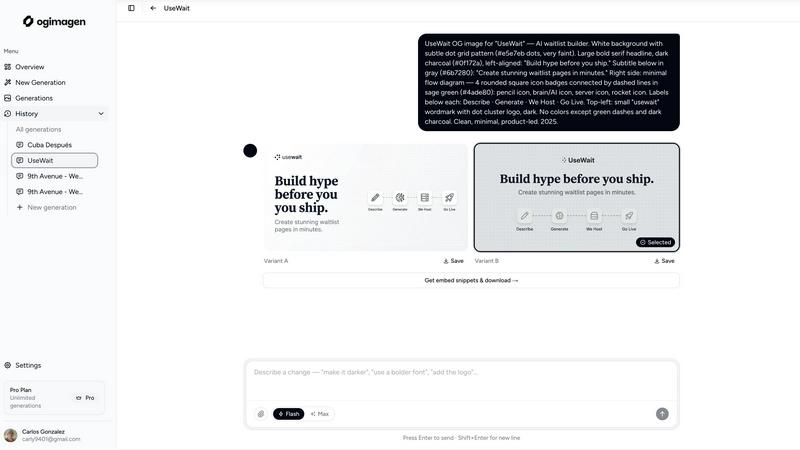
Visual Comparison
OGimagen
RemoveTexts

Feature Comparison
OGimagen
AI-Powered Image Generation
OGimagen utilizes cutting-edge AI technology to create visually appealing Open Graph images tailored to your content. This feature allows users to generate two pixel-perfect variants for optimal display across different social media platforms, ensuring consistency and quality.
Multi-Platform Compatibility
With OGimagen, you can generate Open Graph images that are compatible with various social media frameworks, including Facebook, Twitter, and LinkedIn. This multi-platform support ensures that your images meet the specific requirements of each service, enhancing their effectiveness when shared.
Easy Integration with MCP Tools
The Pro plan of OGimagen offers seamless integration with popular MCP-compatible tools like Claude Code, Cursor, and Windsurf. This feature allows users to generate images directly from their coding environment, streamlining workflows and improving efficiency.
Ready-to-Paste Meta Tag Snippets
After generating your images, OGimagen provides framework-specific meta tag snippets ready for immediate use. This feature simplifies the integration process, allowing users to easily embed images into their websites or applications without additional coding.
RemoveTexts
Paint to Remove
This feature provides users with precise control over the text removal process. By simply brushing over specific areas of text, users can accurately select the elements they want to erase. This ensures that only the intended text is removed, leaving the surrounding image intact.
Auto Remove All
For those who prefer a more automated approach, the Auto Remove All feature allows the AI to detect and remove every text element in the image with one click. This is particularly useful for users who need to process multiple images quickly and efficiently without manual intervention.
Edit & Replace Text
RemoveTexts goes beyond simple text removal by allowing users to edit existing text. This feature enables users to replace text in images while matching the original font style, making it perfect for those looking to update or customize visuals without starting from scratch.
Remove Objects
In addition to erasing text, RemoveTexts includes a powerful object removal feature. Users can easily remove unwanted items, logos, or visual elements from their images, enhancing the overall quality and focus of the composition.
Use Cases
OGimagen
Social Media Marketing
Marketers can utilize OGimagen to create visually compelling Open Graph images for their campaigns. By generating high-quality social cards, they can improve engagement and drive traffic to their content on platforms like Facebook and Twitter.
Blog and Content Creation
Bloggers and content creators can enhance their articles with attractive preview images generated by OGimagen. This not only makes their content more appealing but also increases the likelihood of shares and interactions across social media platforms.
E-Commerce Promotions
E-commerce businesses can leverage OGimagen to create promotional images for their products. By generating eye-catching visuals, they can effectively capture the attention of potential customers when shared on social media, ultimately boosting sales.
Brand Awareness Campaigns
Organizations looking to establish or enhance their brand presence can use OGimagen to generate consistent and professional Open Graph images. By maintaining a cohesive visual identity across platforms, they can strengthen their brand recognition and connect with their audience more effectively.
RemoveTexts
Cleaning Screenshots
RemoveTexts is an invaluable tool for anyone who frequently shares screenshots. Users can effortlessly remove unwanted text, such as chat bubbles or time stamps, ensuring that the focus remains on the content being shared.
Designing Marketing Materials
Marketers and designers utilize RemoveTexts to create clean and professional visuals. By removing watermarks or other distractions from product images, they can present their offerings in the best light possible, enhancing brand perception.
Redacting Sensitive Information
Legal professionals and businesses often need to redact sensitive information from documents and images. RemoveTexts provides a quick solution for removing text while maintaining the integrity of the background, ensuring compliance with privacy standards.
Enhancing Social Media Posts
Social media managers can leverage RemoveTexts to optimize their posts. Whether it's removing unwanted captions or adjusting text overlays, this tool allows for quick edits that enhance visual appeal and engagement on platforms like Instagram and Facebook.
Overview
About OGimagen
OGimagen is an innovative tool designed to streamline the creation of Open Graph images, specifically tailored for social media sharing. Leveraging advanced artificial intelligence, OGimagen allows users to generate stunning social cards in mere seconds, ensuring that any link shared across platforms like Facebook, Twitter, and LinkedIn stands out with professional-grade visuals. Ideal for web developers, marketers, and content creators, OGimagen simplifies the process of crafting engaging preview images that can significantly enhance click-through rates. Users can customize their images by inputting titles, descriptions, and brand colors, after which the AI generates high-quality variants ready for immediate use. With OGimagen, you can elevate your online presence without needing extensive design skills, making it a vital tool for anyone looking to optimize their digital content.
About RemoveTexts
RemoveTexts is a revolutionary AI-powered image editing tool designed to simplify the process of removing unwanted text from images. Functioning without the need for advanced skills or software like Photoshop, RemoveTexts allows users to upload any image and efficiently erase text elements in seconds. This tool is perfect for those who frequently deal with images containing watermarks, captions, or other textual overlays that detract from the visual appeal. With its intuitive interface, even novice users can achieve professional-grade results. The main value proposition of RemoveTexts lies in its ability to seamlessly reconstruct backgrounds after text removal, ensuring that the final image appears natural and untouched. Trusted by over 100,000 creators, marketers, and designers worldwide, RemoveTexts is an essential tool for anyone looking to enhance their visual content quickly and effectively.
Frequently Asked Questions
OGimagen FAQ
What exactly is an OG image?
An OG image, or Open Graph image, is a visual representation of content that is displayed when a link is shared on social media platforms. It enhances the link's appearance, making it more engaging for viewers.
How does AI generation work?
OGimagen's AI analyzes the input provided by the user, such as titles and descriptions, to create visually appealing images. This process ensures that the generated images are relevant and tailored to the user's content.
What's the difference between Starter, Growth, and Pro?
The Starter plan offers 10 generations for a one-time fee, while the Growth plan provides 25 generations and extended CDN hosting. The Pro plan includes 50 monthly generations, MCP integration, and priority processing, catering to more demanding user needs.
Can I cancel Pro at any time?
Yes, users can cancel their Pro subscription at any time without facing penalties. This flexibility allows users to adjust their plan based on their changing needs and usage.
RemoveTexts FAQ
What image formats does RemoveTexts support?
RemoveTexts supports JPG, PNG, and WebP formats, allowing users to upload images of various types for editing. The maximum file size accepted is 10 MB.
Is there a limit to how many images I can process?
There is no stated limit on the number of images you can process with RemoveTexts. Users can continuously use the tool to edit images as needed, making it highly efficient for bulk tasks.
Can I use RemoveTexts for commercial purposes?
Yes, RemoveTexts is suitable for commercial use. Many marketers and content creators utilize the tool to enhance images for advertisements, websites, and other promotional materials.
Does RemoveTexts leave any traces after text removal?
No, RemoveTexts uses advanced AI technology to ensure seamless background reconstruction, leaving absolutely no visible traces or artifacts after the text is removed. The results are professional and appear as if the text was never there.
Alternatives
OGimagen Alternatives
OGimagen is an AI-powered generator designed specifically for creating stunning Open Graph images. This tool falls under the category of Dev Tools, which cater to developers and marketers looking to enhance their online presence. With OGimagen, users can quickly produce social cards that are compatible with various frameworks, ensuring that their links stand out on social media platforms. However, users often seek alternatives to OGimagen for various reasons, including pricing, specific feature sets, or compatibility with their existing platforms. When searching for an alternative, it’s essential to consider factors such as ease of use, the quality of generated images, integration capabilities, and customer support. Finding a tool that aligns with your particular needs can significantly enhance your online marketing efforts and improve user engagement.
RemoveTexts Alternatives
RemoveTexts is an innovative AI-powered image editing tool designed to remove text from images in a matter of seconds. This software falls under the category of image and photo editing, providing a user-friendly solution for anyone needing to clean up images without the complexity of traditional software like Photoshop. Users often seek alternatives due to various reasons, such as pricing concerns, specific feature requirements, or compatibility with different platforms. When searching for an alternative, it's essential to consider the ease of use, the range of features offered, and the quality of results produced. Finding the right alternative also hinges on understanding your specific needs. Some users may prioritize precise editing capabilities, while others might look for bulk removal options or support for multiple languages. The ideal option will align with your workflow and provide the tools necessary to achieve high-quality results efficiently. As the demand for image editing grows, exploring various alternatives can help ensure you find a solution that best fits your unique requirements.