
Hush Touch | Voice-to-Text for MacOS vs Prompt Builder
Side-by-side comparison to help you choose the right tool.

Hush Touch | Voice-to-Text for MacOS
Hush Touch is an offline voice-to-text app for macOS that learns your vocabulary and improves accuracy with every use.
Last updated: February 28, 2026

Prompt Builder
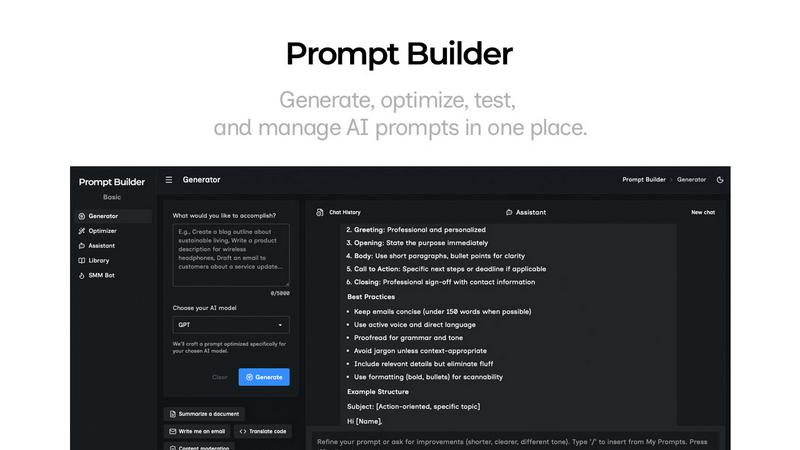
Generate, optimize, test, and manage AI prompts in one place. Turn an idea into a ready-to-use prompt in seconds.
Visual Comparison
Hush Touch | Voice-to-Text for MacOS

Prompt Builder
Overview
About Hush Touch | Voice-to-Text for MacOS
Hush Touch is an innovative voice-to-text application designed specifically for macOS, enabling users to dictate text effortlessly and privately. By utilizing advanced on-device processing, Hush Touch operates without requiring an internet connection, ensuring user data remains secure and confidential. The app combines two powerful Apple transcription engines along with an Apple Intelligence final pass to enhance transcription accuracy and clarity. This makes it ideal for individuals across various fields, including professionals, students, and writers, who seek a reliable and efficient dictation tool. With its lightweight 5.5 MB footprint, Hush Touch integrates seamlessly into everyday writing workflows, allowing users to draft emails, notes, documents, and more, all while maintaining a natural speaking rhythm. The app's unique features, like customizable command phrases and adaptive learning capabilities, make dictation not only easier but also smarter over time. For just $20, users can access a lifetime license, eliminating the need for recurring subscription fees.
About Prompt Builder
Prompt Builder is a prompt engineering workspace for writing, testing, and saving prompts. Describe the task in plain English, and it helps you create a prompt that matches the model you choose. Start with a draft, refine it in chat, save or pin versions, then run them when you are ready. It works with GPT, Claude, Gemini, Llama, Mistral, DeepSeek, Grok, Perplexity, and more. You also get an Optimizer, an assistant for quick tests, and a library of reusable prompts and templates from the community. Turn an idea into a ready-to-use prompt in seconds. Refine it in chat, save it to your Library, and run it anytime.