
Filator vs Prompt Builder
Side-by-side comparison to help you choose the right tool.

Filator
Filator is a versatile platform for creating, converting, and automating tasks with over 500 free tools at your.
Last updated: March 1, 2026

Prompt Builder
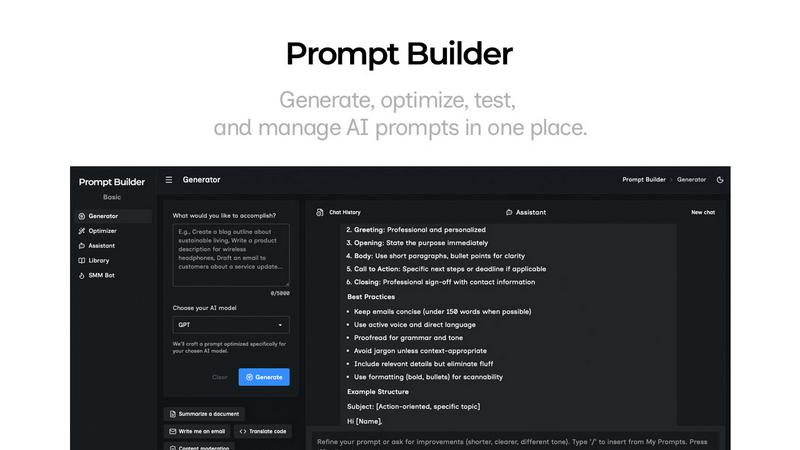
Generate, optimize, test, and manage AI prompts in one place. Turn an idea into a ready-to-use prompt in seconds.
Visual Comparison
Filator

Prompt Builder
Overview
About Filator
Filator is the ultimate digital workspace tailored for professionals seeking both efficiency and privacy. This innovative online platform offers over 500 robust tools, catering to a diverse range of users, including developers, designers, marketers, and educators. What truly distinguishes Filator is its unwavering commitment to user experience. There are no sign-up barriers, no premium tiers that limit functionality, and no invasive data collection practices that jeopardize user privacy. With Filator, users can access a vast array of utilities, including PDF processing, image conversion, and developer tools, alongside AI-powered generators that significantly enhance productivity. Instant results, offline capabilities via Progressive Web Apps (PWA), and secure client-side processing ensure that users' data remains private and secure. Trusted by over 2 million users across 150 countries, Filator streamlines workflows, enabling you to create, convert, and automate tasks effortlessly, all in one cohesive platform.
About Prompt Builder
Prompt Builder is a prompt engineering workspace for writing, testing, and saving prompts. Describe the task in plain English, and it helps you create a prompt that matches the model you choose. Start with a draft, refine it in chat, save or pin versions, then run them when you are ready. It works with GPT, Claude, Gemini, Llama, Mistral, DeepSeek, Grok, Perplexity, and more. You also get an Optimizer, an assistant for quick tests, and a library of reusable prompts and templates from the community. Turn an idea into a ready-to-use prompt in seconds. Refine it in chat, save it to your Library, and run it anytime.