
conceptviz vs dmaya
Side-by-side comparison to help you choose the right tool.

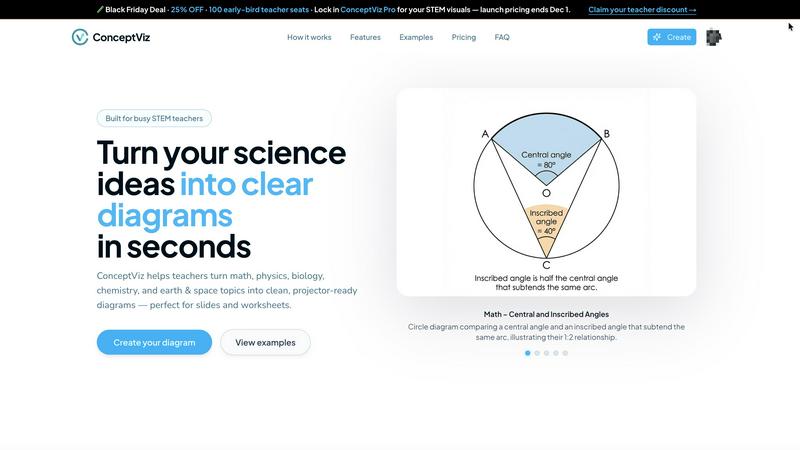
ConceptViz instantly transforms your ideas into clear, science-ready diagrams for effective teaching and learning.
Last updated: February 28, 2026

dmaya
dMaya is an AI design platform that streamlines UI creation, client collaboration, and code export, empowering teams to design efficiently.
Last updated: April 13, 2026
Visual Comparison
conceptviz
dmaya
Feature Comparison
conceptviz
Subject & Grade-Level Presets
ConceptViz is meticulously designed with the classroom in mind, offering a structured starting point through curated subject and grade-level presets. Users can select from core STEM disciplines like Physics, Biology, Chemistry, Earth & Space, and Math, each tuned to specific educational bands such as elementary, middle, and high school. This intelligent scaffolding ensures the generated diagrams are age-appropriate and conceptually aligned with standard curricula, eliminating guesswork and providing a reliable foundation that requires no prior design expertise from the user.
Projector-Ready Clarity & Design
Every diagram generated by ConceptViz is optimized for real-world educational environments. The platform prioritizes functional clarity over decorative flair, producing visuals with thick, legible lines, high-contrast colors, and strategically placed labels. Backgrounds are kept simple and minimal to reduce visual noise, ensuring that diagrams remain crisp and comprehensible even when projected on a large screen from the back of a classroom or printed on a standard worksheet.
Seamless Slide & Worksheet Integration
Understanding the workflow of educators, ConceptViz outputs are engineered for immediate utility. Diagrams are automatically generated in a widescreen aspect ratio ideal for presentation slides in PowerPoint or Google Slides. They are also provided with clean, light backgrounds perfect for printing. Users can download high-resolution PNG files and directly paste them into their existing teaching materials, creating a frictionless bridge between idea generation and classroom implementation.
Plain-English Description to Diagram
The most powerful feature is the intuitive AI interface that converts a user's natural language description into a precise diagram. By simply typing a request like "labeled plant cell cross-section for 8th grade" or "convex lens ray diagram with object between F and 2F," the platform interprets the instructional intent and generates a corresponding visual. This allows educators to create custom diagrams that match their exact teaching explanation, saving hours otherwise spent searching for or manually creating "almost right" images online.
dmaya
AI-Powered Design Generation
dMaya's core feature is its ability to generate production-ready UI designs in mere seconds. By simply describing what you need in plain language, the platform creates complete layouts and responsive variants, allowing teams to focus on creativity rather than tedious manual design work.
Multi-Screen Canvas
The multi-screen canvas feature allows users to work across both desktop and mobile frames simultaneously. This infinite canvas mimics the flexibility of design tools like Figma, enabling users to drag, zoom, and organize their screens effortlessly while benefiting from AI-assisted design capabilities.
Built for Teams & Collaboration
Designed with collaboration in mind, dMaya facilitates real-time teamwork. Users can invite team members, share projects with clients, and leave comments, ensuring that everyone is aligned. Role-based access controls keep the workflow organized, allowing for efficient collaboration among designers, developers, and stakeholders.
Client Presentation Mode
dMaya offers a dedicated client presentation mode that enables users to share polished, interactive previews through a single link. This feature eliminates the need for clients to create accounts, simplifying the feedback process. Users can collect client insights and iterate on designs without ever leaving the platform.
Use Cases
conceptviz
K-12 Classroom Lesson Preparation
Teachers can rapidly generate custom diagrams to enhance daily lessons, populate worksheets, and create engaging presentation slides. For instance, an elementary science teacher can create a clear "Push, Pull & Friction" diagram, while a high school physics instructor can generate a detailed "Block on Incline Free Body Diagram." This use case saves invaluable prep time and provides visuals that perfectly match the teacher's specific pedagogical approach and lesson objectives.
University-Level Instruction & Lectures
Professors and teaching assistants in higher education can use ConceptViz to develop sophisticated diagrams for complex topics in advanced chemistry, biology, physics, and engineering courses. Creating accurate visuals for concepts like acid-base titration setups, mitosis sequences, or mathematical theorems becomes a task of minutes, enhancing lecture clarity and supporting graduate-level instruction without requiring specialized illustration software.
Academic Research & Publication Support
Researchers and graduate students can leverage the tool to create clean, standardized figures for research papers, conference posters, and thesis documents. The ability to generate precise, high-resolution diagrams of experimental setups, theoretical models, or data schematics directly from a descriptive prompt streamlines the publication process and ensures visual consistency and professional quality in academic communications.
Student Study Aid & Project Creation
Students across all levels can use ConceptViz to create their own study guides, clarify challenging concepts through visual representation, and produce high-quality diagrams for school projects and presentations. This active creation process aids in comprehension and retention, empowering learners to visualize and internalize abstract STEM principles in a personally meaningful way.
dmaya
Agencies
Agencies can leverage dMaya to pitch faster and win more clients. By generating design concepts during discovery calls and presenting multiple directions to stakeholders in a matter of hours rather than weeks, agencies can streamline their workflow and enhance client engagement.
Product Teams
Product teams can utilize dMaya to accelerate their design process, moving from ideation to sign-off without the burden of engineering resources. The platform fosters collaboration across design, product, and engineering teams, allowing for version comparisons and reducing the gap between design and development.
Freelancers
Freelancers can take advantage of dMaya to enhance their productivity and profitability. By delivering high-quality designs without extending their working hours, freelancers can accommodate more projects, thereby maximizing their earnings and client satisfaction.
Startups
Startups can benefit from dMaya's rapid design capabilities, allowing them to iterate quickly on their product concepts. By obtaining client feedback early in the process, startups can ensure that their designs resonate with their target audience, leading to a more successful product launch.
Overview
About conceptviz
ConceptViz represents a paradigm shift in educational technology, specifically engineered to bridge the gap between complex scientific understanding and clear visual communication. At its core, it is an AI-powered diagram generation platform that transforms abstract STEM concepts into precise, publication-ready visual aids. It serves a critical need for educators, students, and researchers who require accurate, tailored diagrams but lack the time or specialized graphic design skills to create them from scratch. The tool democratizes the creation of high-quality educational visuals, moving beyond generic clipart to produce diagrams that align perfectly with specific curriculum standards, lesson plans, and research narratives. By allowing users to generate diagrams through simple, plain-English descriptions, ConceptViz dramatically reduces lesson preparation time and enhances the pedagogical impact of visual learning. Its value proposition is universal across the educational spectrum: from a K-12 teacher crafting a worksheet on plant biology to a university professor illustrating quantum mechanics or a researcher preparing a journal figure, ConceptViz provides an accessible, efficient, and reliable solution for turning intricate ideas into comprehensible visuals that foster deeper engagement and understanding.
About dmaya
dMaya is a revolutionary vibe design platform crafted specifically for agencies, teams, and freelancers who prioritize the design phase before diving into coding. Unlike many AI tools that jump straight to code, dMaya facilitates a seamless design-first workflow that allows users to articulate their vision through natural language. By leveraging an intelligent AI agent, users can generate professional-grade UI designs based on simple text descriptions. Whether you're conceptualizing a SaaS dashboard, designing an e-commerce flow, or crafting a mobile app, dMaya turns your ideas into polished screens within seconds. The platform supports real-time iterations through conversational design, enabling users to adjust colors, layouts, typography, and more with immediate precision. When the design is ready, users can share a preview link with clients for instant feedback and approval, significantly accelerating the review cycle. Once approved, dMaya allows for easy exportation of designs as clean HTML, CSS, and JS code, ready for integration with various coding agents like Cursor or Claude Code. Ultimately, dMaya empowers teams to present, approve, and ship their designs with unmatched confidence and efficiency.
Frequently Asked Questions
conceptviz FAQ
What subjects and grade levels does ConceptViz support?
ConceptViz is specifically built for STEM education, supporting core subjects including Physics, Biology, Chemistry, Earth & Space, and Mathematics. It is designed to cater to a wide range of educational levels, from elementary school through to high school and university-level instruction. The platform offers presets tuned for U.S. grade bands (elementary, middle, high) to ensure age-appropriate and curriculum-aligned diagram output.
Do I need any design or drawing skills to use ConceptViz?
No, you do not need any design or drawing skills whatsoever. ConceptViz is built precisely for educators and researchers who are experts in their field but not in graphic design. The entire process is driven by simple, plain-English descriptions of the diagram you need. The AI handles the complex task of layout, drawing, and labeling, delivering a professional-quality visual based solely on your descriptive prompt.
What format are the diagrams, and how do I use them in my materials?
Diagrams are generated as high-resolution PNG image files. They are automatically formatted with a widescreen aspect ratio ideal for presentation slides (e.g., PowerPoint, Google Slides) and feature clean, light backgrounds suitable for printing on worksheets. You can simply download the image file and paste or insert it directly into your preferred software, making integration into your existing teaching workflow seamless and instantaneous.
Is there a free trial or a free plan available?
Yes, ConceptViz offers a free tier that allows users to create diagrams without requiring a credit card. This includes access to generate diagrams with 4K Ultra HD quality. This free plan is designed to let educators and researchers experience the platform's core functionality and assess its value for their specific needs before considering any paid subscription or lifetime deal offers.
dmaya FAQ
How does dMaya improve the design workflow?
dMaya enhances the design workflow by integrating AI technology that generates production-ready designs from text descriptions, allowing teams to focus on creativity rather than manual design tasks. This ensures that the design phase is efficient and effective.
Can I collaborate with my team in real-time on dMaya?
Yes, dMaya is built for collaboration. It allows users to invite team members, share projects, leave comments, and work together in real-time, ensuring that everyone involved is aligned and informed throughout the design process.
What frameworks can I export my designs to?
Once your designs are approved, you can export them as clean HTML, CSS, and JS code, which can then be handed over to any coding agent, including Cursor or Claude Code, for development in frameworks like React, Next.js, and Flutter.
Is there a need for clients to create accounts to provide feedback?
No, dMaya simplifies the feedback process by allowing clients to review designs through a single link without needing to create an account. This feature streamlines client interactions and speeds up the approval cycle.
Alternatives
conceptviz Alternatives
ConceptViz is a specialized AI-powered content creation and data visualization tool designed for the education sector, particularly STEM. It streamlines the process of transforming complex scientific ideas into clear, classroom-ready diagrams, saving educators and researchers valuable time. Users often explore alternatives for various reasons, such as budget constraints, the need for different feature sets like animation or collaborative editing, or a requirement for tools that serve broader design purposes beyond academic diagrams. The search for the right tool is a natural part of finding the perfect fit for one's specific workflow and objectives. When evaluating an alternative, key considerations include the tool's primary focus, its ease of use for non-designers, the quality and style of its output, integration capabilities with other platforms, and of course, its pricing model. The goal is to find a solution that effectively balances power, simplicity, and value for your unique educational or research needs.
dmaya Alternatives
dMaya is an innovative AI vibe design platform tailored for agencies, teams, and freelancers who require a streamlined approach to UI design before diving into coding. By leveraging artificial intelligence, dMaya allows users to generate professional-quality UI designs from simple text descriptions, facilitating rapid design iterations and client feedback. This emphasis on design helps ensure intentional decision-making and early problem detection, ultimately enhancing the overall development process. Users frequently seek alternatives to dMaya for various reasons, including pricing considerations, specific feature requirements, or the need for compatibility with certain platforms. When exploring alternatives, it is essential to consider aspects such as the ease of use, the flexibility of design tools, collaboration capabilities, and the ability to integrate with existing workflows. Understanding these factors can help users find a solution that aligns with their unique project needs and enhances their design and development processes.