
Blueberry vs Shrinkpad
Side-by-side comparison to help you choose the right tool.

Blueberry
Blueberry unifies your editor, terminal, and browser into one seamless workspace for efficient web app development.
Last updated: February 28, 2026

Shrinkpad
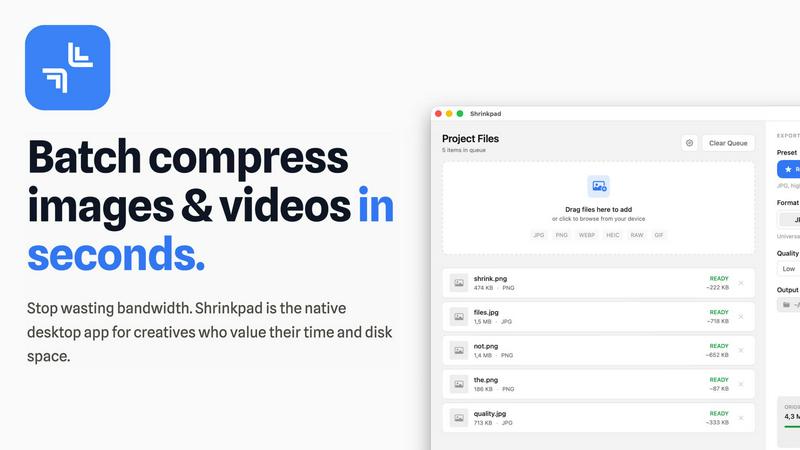
Effortlessly batch compress images and videos on Mac, optimizing your creative assets in seconds with Shrinkpad.
Last updated: February 28, 2026
Visual Comparison
Blueberry

Shrinkpad
Feature Comparison
Blueberry
Integrated Workspace
Blueberry combines a terminal, code editor, and preview browser into one cohesive workspace. This integration allows developers to manage their projects without the need to switch between different applications, enhancing focus and productivity.
Real-Time AI Context
With Blueberry's MCP server, users can connect AI models like Claude and Codex directly to their workspace. This feature ensures that the AI has full context of the project, including open files and terminal outputs, enabling smarter and more context-aware interactions.
Pinned Apps
Developers can dock essential applications such as GitHub, Linear, Figma, and PostHog within the Blueberry workspace. These pinned apps load alongside the project, sharing live context with the AI, which further streamlines the development process.
Visual Context Tools
Blueberry provides features like screenshot capture and element selection directly from the preview browser. This allows developers to give their AI visual context, enhancing the effectiveness of AI interactions and feedback during the development process.
Shrinkpad
Intelligent Compression
Shrinkpad features an intelligent compression algorithm that analyzes the visual complexity of each file, applying the optimal compression ratio without introducing artifacts. This ensures that users do not have to sacrifice quality for file size reduction.
Unlimited Batching
With Shrinkpad, users can process thousands of media files simultaneously without experiencing crashes. This feature is particularly beneficial for those working with large projects, as it allows for efficient handling of extensive queues, unlike many web-based tools.
One-Drop Import
The one-drop import feature simplifies the workflow by allowing users to drag and drop entire folders containing images and videos. Shrinkpad automatically detects all supported files within the folder, streamlining the compression process and saving valuable time.
Privacy-First Approach
Shrinkpad prioritizes user privacy by ensuring that all processing occurs locally on the user's Mac. This means that no files are uploaded to the cloud, giving users peace of mind that their sensitive assets are never exposed to external servers.
Use Cases
Blueberry
Streamlined Development
Blueberry is ideal for developers looking to streamline their workflow. By integrating all necessary tools into one workspace, developers can focus on coding and testing their web applications without interruptions.
Enhanced Collaboration
With pinned apps and live context sharing, teams can collaborate more effectively. Developers can work alongside designers and project managers within the same environment, ensuring that everyone is on the same page.
AI-Assisted Programming
Blueberry's real-time AI context allows for enhanced programming assistance. Developers can ask questions to their AI models while viewing their code and terminal output, leading to quicker problem-solving and more efficient coding.
Responsive Design Testing
The built-in preview browser enables developers to test their applications across various devices, including desktop, tablet, and mobile. This feature ensures that applications are responsive and user-friendly before deployment.
Shrinkpad
Streamlined Creative Projects
Photographers and designers can leverage Shrinkpad to quickly compress large batches of images and videos, allowing them to focus more on the creative aspects of their projects instead of wasting time on file management.
Enhanced Website Performance
Web developers can use Shrinkpad to reduce the size of images and videos before uploading them to their websites. This optimization leads to faster load times and improved user experience, which can significantly impact SEO rankings and user retention.
Efficient Media Management
Content creators dealing with extensive collections of media files benefit from Shrinkpad's ability to batch process and compress multiple file types. This feature helps in organizing and managing assets more effectively, ensuring that they are always ready for use.
Simplified Asset Exports
Artists and designers using software like Figma or Photoshop can save time by exporting all assets at once. Shrinkpad automatically takes care of compression and renaming, making it easier to manage multiple output files without manual intervention.
Overview
About Blueberry
Blueberry is an innovative macOS application designed for modern product builders, integrating a code editor, terminal, and browser into a singular, focused workspace. By consolidating these essential tools, Blueberry eliminates the hassle of switching between multiple applications, allowing developers to concentrate on coding and shipping web applications with ease. Built with a user-friendly interface, Blueberry is particularly beneficial for developers who utilize AI models like Claude, Codex, and Gemini, as it provides these models with real-time access to files, terminal output, and live previews. This seamless integration means that developers can interact with their AI tools without the tediousness of copy-pasting context. Currently in its beta phase, Blueberry is available for free on macOS, making it accessible for developers looking to enhance productivity and streamline their workflow.
About Shrinkpad
Shrinkpad is a cutting-edge batch compression tool specifically designed for macOS users who require efficient handling of large media files. This powerful native desktop application caters to creatives such as photographers, designers, and content creators by allowing them to compress images and videos swiftly while maintaining their quality and privacy. Shrinkpad operates locally on the user's device, eliminating the need for cloud uploads or external servers, which means that sensitive media files remain secure. Users can achieve a remarkable reduction in file sizes by up to 90%, optimizing storage space and improving workflow. With seamless support for over 50 file formats and customizable settings, Shrinkpad is an essential tool for professionals seeking to streamline their creative processes and eliminate the hassle of managing oversized media files.
Frequently Asked Questions
Blueberry FAQ
What platforms is Blueberry available on?
Currently, Blueberry is available exclusively for macOS users. It is designed to enhance the development experience on Apple computers.
Is Blueberry really free during beta?
Yes, Blueberry is completely free during its beta phase, allowing developers to try out its features without any cost. This is an excellent opportunity for users to explore its capabilities.
Can I use Blueberry with any AI model?
Yes, Blueberry supports various AI models, including Claude, Codex, and Gemini, through its integrated MCP server, providing flexibility for developers to choose their preferred tools.
How does Blueberry enhance productivity?
By consolidating essential development tools into one workspace, Blueberry minimizes distractions and interruptions, allowing developers to focus on building and shipping high-quality web applications.
Shrinkpad FAQ
Can I use Shrinkpad for free?
Yes, Shrinkpad offers a free starter version with essential tools for casual use, including standard compression for common formats.
What file formats does Shrinkpad support?
Shrinkpad supports over 50 file formats, including JPG, PNG, WEBP, AVIF, MP4, and MOV, making it versatile for various media types.
Does Shrinkpad support video compression?
Absolutely, Shrinkpad includes strong video compression capabilities, allowing users to reduce the size of video files efficiently.
How many files can I process at once?
With Shrinkpad, users can process an unlimited number of files in a single batch, making it highly efficient for large-scale projects and workflows.
Alternatives
Blueberry Alternatives
Blueberry is a versatile Mac application that integrates an editor, terminal, and web browser into a single, focused workspace. This innovative approach streamlines the development process by allowing users to connect various models like Claude or Codex, enabling a seamless flow of information across files, terminal outputs, and live previews. With Blueberry, developers can enhance their productivity by eliminating the need to switch between multiple windows. Users often seek alternatives to Blueberry for various reasons, including budget constraints, different feature requirements, or compatibility with other operating systems. When searching for an alternative, it’s essential to consider factors such as usability, integration capabilities with other tools, and the specific functionalities that align with your workflow. A thoughtful evaluation can help ensure that the chosen solution meets your needs effectively.
Shrinkpad Alternatives
Shrinkpad is a batch compression tool designed specifically for macOS users, enabling efficient compression of images and videos while maintaining privacy and quality. As a native desktop application, it stands out in its category by allowing users to manage large media files without the overhead of cloud services, ensuring that all data remains securely on their devices. Users often seek alternatives to Shrinkpad for various reasons, including pricing, feature sets that better meet their needs, or compatibility with different operating systems. When choosing an alternative, it is essential to consider factors such as ease of use, the range of supported file formats, the balance between compression level and quality, and whether the tool operates locally to ensure data security.